
Why Most Free AI Humanizers Aren’t Really Free

Summary
This article explains why free AI humanizers often feel limited: tiny word caps, login walls, unclear usage limits, weak free output, and upgrade pressure after only a few tries. If you want the practical shortlist, read our guide to the best free AI humanizer that is actually usable.
Most free AI humanizers are not exactly fake. The problem is that many of them are only free in the most technical sense. You can test them, maybe run a short paragraph, maybe get one decent-looking result, but the moment you try to use them like a real writing tool, the limits show up fast.
That is why I do not think the real question is “Is this AI humanizer free?” The better question is whether it is free in a way that actually helps you get work done. If you want the decision-first version of that idea, start with this guide to the best free AI humanizer with unlimited words and no sign-up. That page explains what a genuinely usable free option looks like before you get into the weeds.
What “free” usually means in this category
One reason this topic gets so muddy is that “free” can mean almost anything.
Sometimes it means a real open tool. Sometimes it means a tiny monthly allowance. Sometimes it means a short trial dressed up like a free plan. And sometimes it means the tool is technically free, but only after login, account setup, or a workflow that keeps pushing you toward payment.
That is where people start feeling annoyed. They searched for a free AI humanizer because they wanted something simple. Paste text, get a stronger rewrite, move on. Instead, they end up in a half-open product experience that feels more like a funnel than a tool.
In my view, that is the real dividing line in this category: free to test is not the same as free to use.
Free to test vs free to use
The biggest issue with most free AI humanizers is not that they're fake, it’s that they’re free to test.
A free to test tool only gives you enough access to test the interface or run one single sample and then you’re jammed by a word cap, login wall, monthly limit, quality ceiling, or upgrade prompt.
A free to use tool is not like that. You’re able to return, revise another paragraph, test another version, or keep using it for small everyday writing projects without being pressure-mounted on buying.
That matters because most people don’t only run an AI humanizer once. They run it section by section. One paragraph. One email. One product description. One introduction blog post. One short message. And so on.
Free model type | What it feels like | Common user problem |
|---|---|---|
Free to test | You can run one small sample or try the interface once. | Not enough to judge real output quality. |
Free with signup | You can use the tool only after creating an account. | Adds friction before users see the result. |
Free with tiny limits | You get a very small word cap or a few free runs. | Hard to edit real paragraphs or compare versions. |
Free to use | The free layer remains practical for repeated short edits. | Best fit for everyday writing workflows. |
Why users feel misled even when a tool is technically free
A lot of disappointment comes from the gap between the label and the actual experience. A tool may not be lying when it says “free,” but the day-to-day reality still feels underwhelming.
The input limit is too small for real work
This is one of the fastest ways a free tool stops feeling useful. A short limit might be enough for a sentence or a tiny paragraph, but it does not tell you much about how the tool handles a real blog section, an email draft, or a chunk of longer writing.
I do not expect every free tool to be generous. That is not the point. The point is that if the allowance is so small that you cannot judge the product properly, then the “free” version is functioning more like a teaser than a usable plan.
In our hands-on comparison of 20 free AI humanizers, Humbot is one of the clearest examples. It may sound free at first glance, but 100 words per run and 200 words per month is just too small to matter for most real writing. QuillBot lands in a softer version of the same problem. It is not unusable, but the 125-word limit makes it much more realistic for short cleanup than for serious rewriting.
The tool adds friction before you can even judge it
This is another thing roundup articles often underplay. A tool might technically be free, but if it asks for login, account verification, or repeated upsell clicks before you can properly test anything, the experience already feels worse.
That matters because friction changes how people evaluate the product. A tool that lets you start immediately feels open. A tool that makes you create an account before you even know whether you like the output feels gated, even if the price is still zero.
Again, you can see that pattern in our actual review of free AI humanizer tools. Grammarly is one of the clearest examples of a product that looks free in marketing but pushes users toward account-based usage and upgrade logic too quickly. QuillBot, StealthWriter, and Ryne AI also carry more access friction than tools you can open and use right away.
The free output is often weaker than the promise
This is where a lot of tools lose people. The issue is not just access. It is whether the rewrite is any good once you finally get it.
Some free humanizers give you output that feels shallow, over-smoothed, or too close to simple synonym swapping. You end up with text that is technically different, but not better in a way that saves time. And that is where “free” starts feeling hollow. Nobody is looking for free output just for the sake of getting output. They want something worth keeping.
In our testing, HumanizeAI.pro is a good example of this trade-off. It is easy enough to open, but the rewrite quality is not strong enough to make it a top recommendation. Humanizer.Pro has a similar problem, except it combines weaker output with a tighter cap, which makes the free layer feel doubly narrow. By contrast, GPTHumanizer, MyDetector, and Smodin feel more believable as free options because the access is not the only thing working in their favor. The actual output is usable too.
“Free” often means constant upgrade pressure
This is probably the most frustrating version of all. You can use the tool, but every part of the experience nudges you toward payment. More words, more attempts, better quality, or basic continuity all sit just behind a paywall.
At that point, I stop thinking of the tool as genuinely free. It is just a paid product with a tiny preview layer on top.
That was the pattern with Phrasly, Walter Writes, and Undetectable AI in our broader comparison. They make more sense as short trials than as true free-use tools. AISEO is a little more usable, but it still leans closer to a trial-style experience than a clean, low-friction free plan.
The difference between “free to test” and “free to use”
This is the distinction that clears up almost the whole category.
Type | What it usually means | How it feels in practice |
Free trial | A short sample or limited-time access | Fine for testing, weak for ongoing use |
Tiny free tier | Small cap, small quota, or very short inputs | Possible to try, hard to rely on |
Friction-heavy free tier | Login, gating, or repeated upgrade pushes | Technically free, but annoying |
Real free plan | Repeatable use, decent room to test, useful output | Actually practical |
Once you look at tools this way, the confusion drops fast. The problem is not that free AI humanizers do not exist. The problem is that many of them are free in a way that breaks down the moment you try to use them like part of a real workflow.
What a genuinely usable free AI humanizer should offer
I think a usable free plan needs to do four things well.
First, it should give you enough room to test real writing, not just one tiny sentence.
Second, it should keep friction low. If a product needs too many steps before first use, it already feels less free.
Third, the output needs to be worth saving. This is the biggest one. I would take a smaller but stronger free plan over a bigger one with weak rewriting almost every time.
Fourth, it needs to feel repeatable. A real free tool should let you come back tomorrow and use it again without turning every visit into another barrier.
That is exactly why some tools feel much more honest than others. If you want the more focused version of that argument, our piece on what a real free AI humanizer plan actually looks like goes deeper into that standard.
So which free tools actually feel worth using?
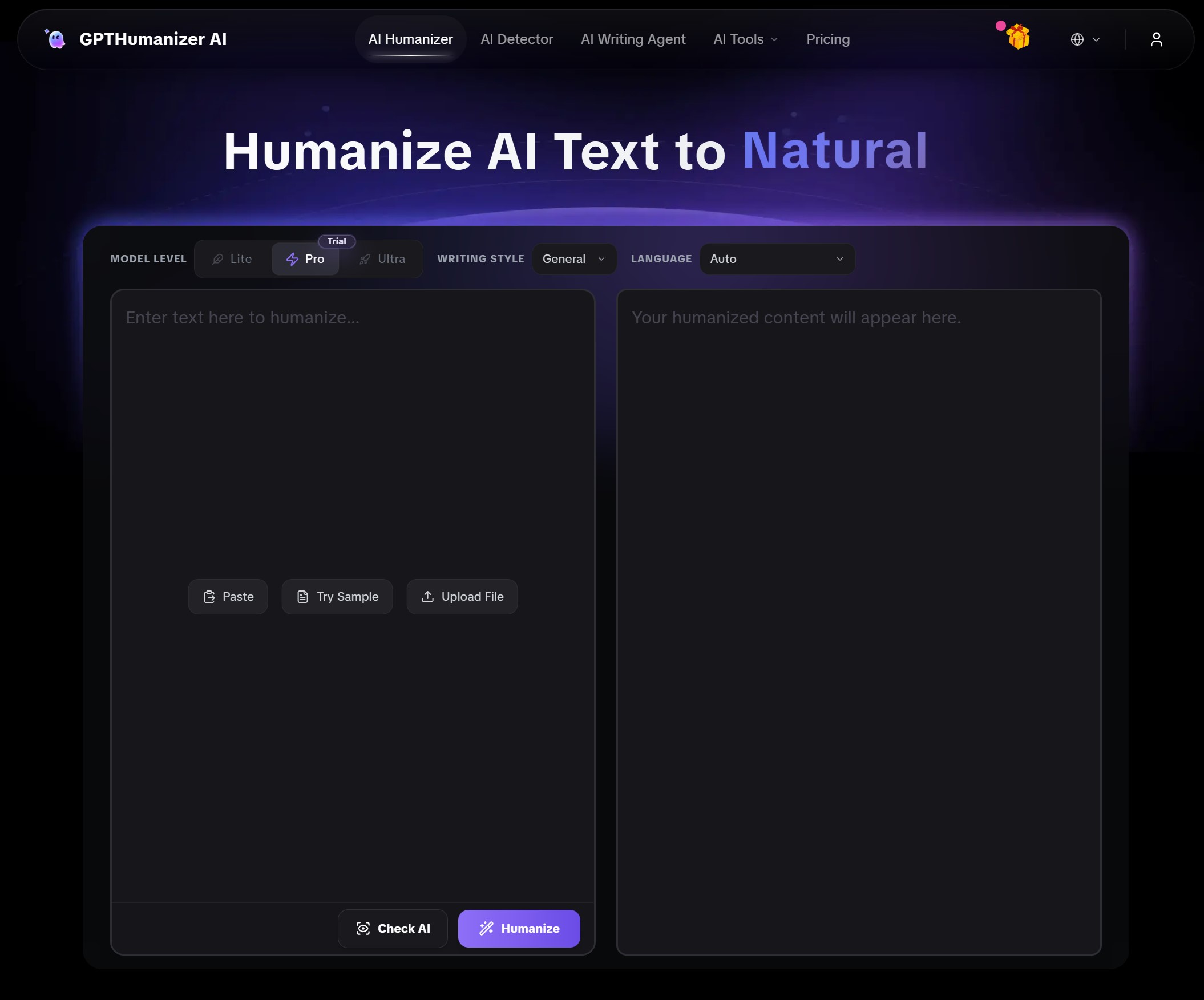
Based on the way this market behaves, I would separate the tools into three mental buckets.
Some are fine for quick testing. That is where I would put options like QuillBot or HumanizeAI.pro. They can still be useful, but mainly in narrow situations.
Some are genuinely more practical, even with limits. MyDetector and Smodin make more sense here because they leave enough room for real work.
And some feel closer to an actually usable free product rather than a trial with a “free” label. That is where GPTHumanizer stands out. It is not just that the tool is open. It is that the free layer feels workable enough for normal everyday use, which is a much rarer thing in this category than most comparison posts admit.
Why uses always feel FREE is Fake
Tiny word caps make real editing hard to achieve
A tiny word cap is approximately perfect for a demo, but not for real editing. Most people don’t want to rewrite a single sentence. People want to revise a paragraph, a short email, a product description or a blog section.
When the free limit is too small, the user has to break the text into awkward chunks. And that not only makes the tool technically but not really free.
Login walls create a friction before you feel value
Some tools are free only if you sign up. That’s not always a bad thing, but currently it is not the same experience as a free tool. First you need to create an account and only then you know if the tool is useful.
For quick copy editing, that matters. If you want to see if one paragraph was rewritten, a login wall makes the tool feel less free than the landing page advertised.
Poor free output creates hidden work
Another issue is output quality. If a free tool still produces stiff, awkward or close-to-original AI text, that also creates hidden work.
The user still has to clean up unnatural sentences, fix meaning drift, or simply rewrite the text by hand. And in that case the free tool really saves less time than you think.
Upgrade pressure starts too early
A lot of free tools try very hard to move the user to payment. And while that’s a business logic, it might also create the impression that the free layer is just a teaser rather than a usable plan.
An AI humanizer for free seems more transparent if the user can try the workflow properly before deciding whether a paid plan is relevant.
Conclusion
Most free AI humanizers are not scams. They are just much narrower than users expect. The label says free, but the experience often comes with tiny limits, login friction, weak output, or constant upgrade pressure that makes normal use harder than it should be.
That is why I think the smartest way to judge this category is simple: stop asking whether a tool is free, and start asking whether it is usable. The best free AI humanizers are not the ones with the loudest “free” label. They are the ones you can actually open, test, and keep using without feeling blocked every few minutes.
FAQ
Q: Why do free AI humanizers often feel disappointing even when they cost nothing?
A: Many free AI humanizers only offer narrow access, tiny limits, weak output, or upgrade-heavy workflows, so the product feels more like a demo than a tool you can actually keep using.
Q: What is the difference between a free AI humanizer and a real free plan?
A: A free AI humanizer may only let you test the product briefly, while a real free plan gives you enough access, output quality, and repeatability to support normal writing tasks.
Q: Which free AI humanizers feel too limited for real use?
A: In practical testing, tools like Humbot, Phrasly, Walter Writes, and some trial-style products feel too constrained to count as strong everyday free options.
Q: Why does no-sign-up access matter so much in free AI humanizer tools?
A: No-sign-up access matters because it removes early friction, speeds up testing, and makes the product feel genuinely open instead of account-gated from the first click.
Q: Which free AI humanizer feels closest to a genuinely usable free product?
A: GPTHumanizer stands out because the free experience feels more workable for normal use, rather than functioning like a narrow preview designed mainly to push upgrades.

Related Articles

HIX Bypass Pricing Explained: Is It Worth Paying For in 2026?
A practical look at HIX Bypass pricing, paid-plan value, word limits, refund terms, and whether it i...
 Ethan Miller
Does Hixbypas Work in 2026? Fast, and Aggressive Modes Tested
Does Hixbypas, or HIX Bypass, actually work? I tested Fast and Aggressive modes to compare rewrite q...
Ethan Miller
Best HIX Bypass Alternative: Free, No-Sign-Up AI Humanizer Compared
Looking for a HIX Bypass alternative? Compare HIX Bypass with GPTHumanizer for free access, no-sign-...
Ethan Miller
StealthGPT AI Review 2026: Features, Pricing, Output Quality, and Alternatives
I reviewed StealthGPT AI across pricing, features, rewrite quality, and real writing use cases. See ...
Ethan Miller