
GPTHumanizer AI Review(2026): Does It Really Work?

Summary
Editor’s note: This review is a first-party product evaluation written from the perspective of the GPTHumanizer AI team and based on hands-on testing of the product.
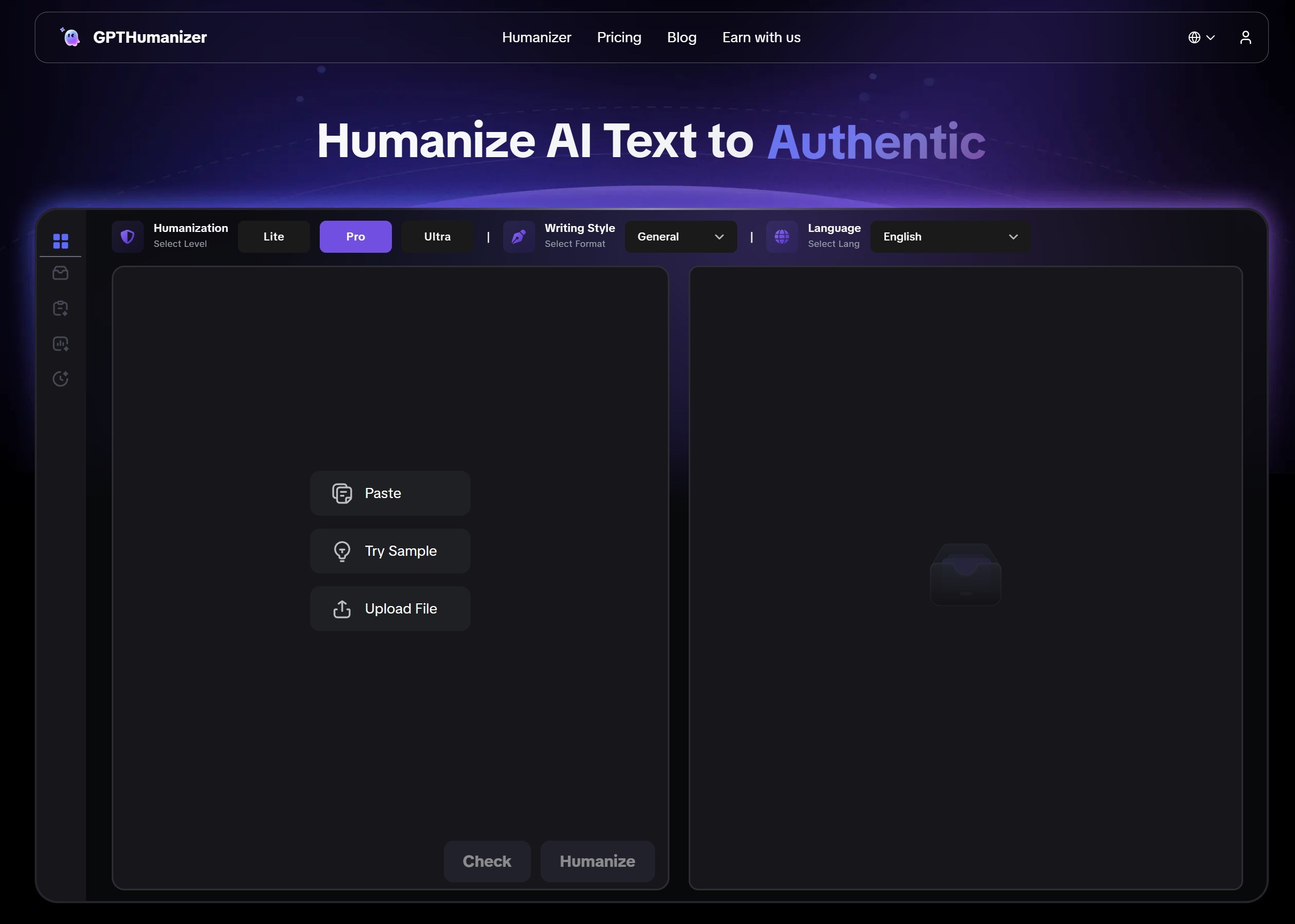
With AI writing improving fast, it’s getting harder to tell human and machine-written text apart. That’s why AI humanizer tools have grown popular—mainly to improve flow and make AI drafts sound less formulaic.
One of the many competing tools in this niche market is GPTHumanizer AI. It claims to be a powerful all-in-one tool for students, marketers, bloggers and professionals seeking to humanize their AI-generated drafts. But with so many tools making similar claims, the question remains: Does GPTHumanizer AI really work?
After testing it, my view is simple: GPTHumanizer AI is one of the more practical AI humanizer tools for users who want smoother, more natural-sounding rewrites without adding much friction to their workflow. Its main strengths are easy access, multiple rewrite models, and solid meaning retention. Its main limitation is also straightforward: important drafts still need human review before publishing, submitting, or sending. Used that way, it is a strong option for bloggers, marketers, students, and general users.
GPTHumanizer AI: Quick Overview
GPTHumanizer AI is positioned as a text-rewriter that makes AI drafts read more naturally while trying to keep the original meaning intact. It is aimed at bloggers, marketers, professionals, and general users who want to improve the readability of AI-assisted drafts.
The main selling point of GPTHumanizer AI is to do more than just simply replace words and do superficial changes to the text. Instead, GPTHumanizer AI claims to rewrite content at a deeper level. By doing so, GPTHumanizer AI aims to keep the same original meaning and purpose of the text but instead rewrites the structure, tone and style of the text to make it less robotic and predictable than the output from AI models. GPTHumanizer AI also promises to support many languages and styles of writing.
How Does GPTHumanizer AI Work?
To understand how GPTHumanizer AI works, it is necessary to first understand what AI humanization is and how it works. An AI humanizer works by taking text from an AI and altering it in such a way to try to mimic the statistical properties and styles of human writing. An AI humanizer works by revising wording, sentence flow, and structure so AI-generated drafts read more naturally and less repetitively. In practice, the goal is to improve readability, variation, and tone while keeping the original meaning intact.
Human writing tends to exhibit higher perplexity and burstiness compared with many AI-model outputs, which often lean toward more predictable word usage and more uniform sentence structures. All commercial AI humanizers typically use either rule-based algorithms or machine-learning algorithms to humanize content.
Rule-Based vs. Machine Learning-Driven Approaches
The simplest approach would be to use a rule-based system, what some people call an "article spinner". These work by using a dictionary of synonyms and rules that change words into their synonyms, delete articles, etc. However this will produce text that has awkward phrasing, incorrect grammar, or that uses an incorrect synonym. However, this kind of surface-level rewriting often creates awkward phrasing, weak grammar, or unnatural word choices, which makes the final text less useful in real writing situations.
In contrast, what GPTHumanizer AI claims to be humanizers are driven by machine learning using highly advanced large language models (LLMs) such as the T5 transformer architecture. These humanizers have been trained on a vast corpus of human-written text and understand the subtleties of language, context and style. Rather than just swapping words for their synonyms, GPTHumanizer AI can do deep rewrite work, such as:
● reorganizing sentence structure to produce more complex and varied syntax;
● breaking up or combining sentences to mimic the natural rhythm of human thought;
● choosing contextually appropriate synonyms to preserve the original meaning;
● adjusting the tone and formality of the text to match a particular style;
Some of the more advanced humanizers even use a discriminator-guided rewrite approach, in which a text detector is installed within the humanizer to "guess" what the humanizer should do. Some advanced systems may use internal quality scoring or feedback loops to reduce repetitive phrasing and improve fluency across multiple rewrite passes.
In Plain English
One-sentence summary: This tool isn’t just swapping synonyms — it rewrites sentence structure and rhythm to sound less predictable.
Why it can sound more natural: it changes how ideas are expressed (splitting/combining sentences, reordering clauses) instead of doing surface-level edits.
Why it can be more consistent (no 100% promises): it may use internal scoring / feedback to reduce “AI-like” patterns, but detectors change, so results aren’t guaranteed every time.
How GPTHumanizer AI Implements These Techniques
Putting it all together, GPTHumanizer AI works roughly as follows:
Analyze: the tool checks the draft for repetitive or overly uniform patterns.
Rewrite: it paraphrases by restructuring sentences, adjusting phrasing, and smoothing tone.
Optional quality check: some systems may review the output again and make further adjustments if the wording still feels repetitive, stiff, or unnatural.
Key Features of GPTHumanizer AI
GPTHumanizer AI stands out from other humanizer AI tools due to the myriad of features which give users more control and flexibility when humanizing their text. A list of its most useful features are listed below and were updated to reflect the most recent update on its official website in October 2025.
Multi-Model Humanization
One of GPTHumanizer AI's major strengths is its tiered humanizing system which offers three separate models depending on the user's budget and humanizing needs.
● Lite Model: The Lite model is free and offers basic humanizing capabilities. The Lite model is a good option if you have very light humanizing needs and do not want to pay for a paid plan.
● Pro Model: A balanced rewrite of the original text that retains the original meaning and structure whilst making the text more fluent and natural.
● Ultra Model: An advanced version of the Pro model that makes larger changes to the original text based on a full understanding of what is being said, resulting in a more thorough and humanized rewrite.
Advanced Writing Styles and Tone Control
A major update was made to GPTHumanizer AI in its latest update on October 2025 which allows the user to choose from a total of 8 different writing styles. This feature is useful if you want to humanize text to appeal to a specific type of audience, or for a specific type of content. This is a huge advantage over other humanizer AI tools which only offer one tone of text. For more information, check our practical guide on Which GPTHumanizer Writing Style Should You Choose?
Writing Style | Ideal Use Case |
General | Everyday communication, standard articles, and general content. |
Academic | Research papers, essays, theses, and academic articles. |
Blog | Blogs, conversational articles, and SEO-friendly writing. |
Casual | Social media posts, personal messages, and informal content. |
Professional and personal email correspondence. | |
Professional | Business reports, formal documents, and corporate communications. |
Scientific | Scientific reports, technical papers, and research documents. |
Technical | Instruction manuals, product specifications, and technical guides. |
Multilingual and Global Accessibility
GPTHumanizer AI is designed to be used all over the world with 11 languages available. Users can choose the language and receive the output in the same language. Payments can now be made in 32 currencies so no one gets stuck with the wrong currency for the wrong country.
High-Quality, Meaning-Preserving Rewriting
The platform stresses that its technology does more than just replace individual words. It focus on "true humanization" by understanding the meaning and intent of the original text. The rewriting engine rephrases complex sentences and vocabulary to produce fluent, authentic and grammatically correct content without changing the original meaning.
Integrated AI Detector and SEO Enhancement
To support the editing workflow, GPTHumanizer AI also includes a built-in AI checker. The free plan includes limited checker access, while paid plans include broader checker usage for users who want additional feedback on tone consistency, readability, and whether a draft still feels overly uniform. It can also help users refine wording and clarity in ways that may support better on-page readability, though writing quality and search performance always depend on the full content and publishing context.
For the underlying reason detectors react to ‘uniform’ writing, read this explanation of perplexity, burstiness, and why AI text feels flat.
Enhancing Readability and Content Quality
GPTHumanizer AI is good at its main job of improving the readability and natural flow of AI-generated content. Users have claimed that the tool does a good job of making robotic-sounding drafts into more engaging and authentic content, especially for marketing copy, blog posts and general communication. The introduction of multiple writing styles also helps it do a good job of producing contextually appropriate content.
Real Test Result
To further test whether GPTHumanizer AI really works, we are going to let ChatGPT randomly generate an article and pick 400 words from it for our test. Then, I will evaluate the quality of the rewrite from the perspective of tone and style, as well as whether it maintains the original meaning. Finally, I’ll compare the rewrite for meaning retention, readability, and overall flow, and then include detector screenshots as secondary reference points rather than the main basis of judgment.
Test Setup
Text source: A fresh article generated by ChatGPT (used only to produce a neutral AI draft for testing).
Sample size: 400 words, extracted from the generated article (single-sample test).
Process: (1) Generate article → (2) select 400 words → (3) humanize with GPTHumanizer AI → (4) review output quality → (5) run detector checks.
Evaluation Criteria (what I’m judging)
Meaning retention: Are the original claims and intent preserved?
Naturalness (tone & flow): Does it sound less formulaic/robotic?
Structure changes: Are there useful sentence-level changes (splits/combines/reorders) rather than shallow word swaps?
Readability: Is it clearer and easier to follow?
Findings
Meaning retention: The rewrite keeps the core meaning intact; the article notes it “did a really good job preserving the meaning” after close reading.
Naturalness: The output is described as reading more human-like, and it also improves a common “robotic” pattern (excessive dashes).
Structure changes: Changes appear moderate rather than drastic—the article emphasizes that word count and paragraph structure were maintained, suggesting the humanization focuses more on sentence-level smoothing than a full re-outline.
Readability: The rewrite is presented as more fluent and natural overall, with fewer repetitive “AI-like” quirks noted in the before/after reading experience.
Detector Snapshots (secondary reference)
In this test, GPTHumanizer AI produced a rewrite that largely preserved the original meaning while making the phrasing feel less uniform. I reviewed the output specifically for tone, flow, and whether any key points were altered. I then tested the output using GPTZero, ZeroGPT, Originality AI, and Winston AI. The detector screenshots below are included as supporting evidence, but the main judgment comes from readability, structure changes, and meaning retention.
Test Result From GPTZero - Highly confident Human
Test Result From ZeroGPT - Highly confident Human
Test Result From Originality AI - 96% confident original
Test Result From Winston AI - Highly confident Human
Based on this single test, GPTHumanizer AI did a solid job preserving meaning while making the draft read more smoothly and less repetitively. I would still treat detector screenshots as limited reference points rather than guarantees, since detector behavior can change over time.
User Reviews and Feedback
Various user impressions paint GPTHumanizer AI positively in terms of usability and output quality. One recurring theme in early feedback is that users find it easy to test and helpful for polishing drafts so they read more smoothly and less mechanically. On Reddit, for example, one user described it as a free and reliable tool for polishing AI-assisted writing.
GPTHumanizer is still pretty new on Trustpilot with just a few reviews so far. One user said, "This app helped me paraphrase long research parts. I don't get stuck anymore lol." Another person mentioned that GPTHumanizer helped them polish their writing and they got praise from their teacher.
Pricing and Plans
GPTHumanizer AI now has a clearer pricing structure than the older version of this review showed. The current pricing page highlights annual subscription pricing for Basic, Standard, and Pro, plus a Lifetime option for users who prefer a one-time purchase instead of another recurring monthly bill.
Here is the current breakdown:
Plan | Price | Monthly Word Limit | Max Input Per Run | Models | Writing Styles | Languages | AI Checker | Extra Notes |
|---|---|---|---|---|---|---|---|---|
Free | $0/mon | Unlimited Lite use | 300 words | Lite only | No | No | Yes | Best for quick tests and short edits |
Basic | $7.99/mon | 5,000 words/mon | 800 words | Lite / Pro / Ultra | 8 styles | 11 languages | Unlimited | Fast rewrite speed |
Standard | $9.99/mon | 30,000 words/mon | 1,200 words | Lite / Pro / Ultra | 8 styles | 11 languages | Unlimited | Priority support |
Pro | $14.99/mon | Unlimited words/mon | 4,000 words | Lite / Pro / Ultra | 8 styles | 11 languages | Unlimited | Ultra fast rewrite speed, priority support |
Lifetime | $199 lifetime | Unlimited words lifetime | 4,000 words | Lite / Pro / Ultra | 8 styles | 11 languages | Unlimited | Includes premium features, future premium features, and priority support |
If your main goal is ‘free + unlimited usage,’ start here: best free AI humanizer with unlimited words (no sign-up required).
The Free Lite Plan
The most compelling part of GPTHumanizer AI’s offering is still its free Lite workflow. Unlike tools that only give a one-off teaser or force sign-up before you can test anything properly, GPTHumanizer AI lets users keep using the Lite model with much less friction.
Each request is limited to 300 words, but there is no limit on how many times you can use the Lite workflow. In real use, that is enough for paragraph editing, short blog sections, email drafts, social copy, and quick rewrites. That makes the free version much more practical than the typical “free in name only” setup.
Paid Plans and Lifetime Option
For users with heavier writing needs, the paid options now make more sense than the older version of this review suggested. Basic works for lighter recurring use, Standard is a better fit for regular content workflows, and Pro is clearly designed for users who do not want to manage monthly caps closely.
The new Lifetime option also changes the buying decision. For users who expect to rely on the tool for a long time, it gives GPTHumanizer AI a stronger long-term value angle than a simple monthly-only pricing model.
Comparison with Other AI Humanizer Alternatives
There’s no shortage of AI humanizers now, so the useful question is not just which tool exists, but which one gives you the best balance of access, rewrite quality, and real usability. Compared with several recognizable alternatives, GPTHumanizer AI stands out more for workflow balance than for flashy claims.
Tool | Free Access | Main Strength | Main Limitation | Best For |
|---|---|---|---|---|
GPTHumanizer AI | Yes — unlimited Lite use | Strong balance of accessibility, rewrite depth, and model options | Important drafts still need human review | Bloggers, marketers, students, and general users |
StealthGPT | No meaningful free workflow | Broad feature set | Higher entry price | Users willing to pay early for a fuller suite |
Stealth Writer | Limited free access | Decent for quick experimentation | Weaker value for regular use | Casual testers |
Walter Writes AI | Trial-style access | Good brand recognition and broader language appeal | Less compelling long-term value | Users comparing multiple branded tools |
If you’re looking for a broader comparison beyond this review, check out Top AI Humanizers of 2026 for a fuller breakdown of more tools, pricing, and use cases.
Conclusion
So, is GPTHumanizer AI worth using? In my view, yes — especially if you want a practical AI humanizer that is easy to try, easy to understand, and noticeably better than shallow word-swapping tools.
Its biggest advantage is balance. You get a lower-friction entry point, multiple rewrite models, useful style flexibility, and output that usually feels more natural while keeping the original meaning reasonably intact. That makes it a strong fit for bloggers, marketers, students, and general users who want cleaner AI-assisted writing without turning editing into a complicated process.
The limitation is also straightforward: it is still a writing tool, not a substitute for judgment. Important drafts should always be reviewed by a human before publishing, submitting, or sending. Used that way, GPTHumanizer AI is one of the more convincing tools in this category.
Frequently Asked Questions
1. Is GPTHumanizer AI worth it?
In my view, GPTHumanizer AI is worth trying if you want AI-generated text to sound more natural without adding too much friction to your workflow. Its biggest strengths are easy access, multiple rewrite models, and a practical free Lite option. The paid plans make more sense once you need larger limits, stronger rewriting, and a workflow that scales better for regular use.
2. Is GPTHumanizer AI free to use?
Yes. GPTHumanizer AI offers a free Lite workflow that lets users test the tool in real use instead of just clicking through a tiny demo. The Lite option is best for short edits and quick rewrites, while the paid plans are designed for users who need higher limits, larger per-request capacity, and more scalable long-term use.
3. Is GPTHumanizer AI legit and safe to use?
GPTHumanizer AI appears to be a real commercial product with a live pricing structure, public feature set, and an accessible workflow for testing. For normal blog writing, marketing drafts, and general content editing, it looks reasonable to use. As with any online writing tool, I still would not upload highly sensitive legal, financial, or confidential internal material without reviewing the platform’s policies first.
4. What is the difference between the Lite, Pro, and Ultra models?
The main difference is rewrite depth and intended use. Lite is the simplest option and works well for quick everyday edits. Pro gives you a stronger rewrite that usually feels smoother and more natural. Ultra is designed for users who want the most advanced level of restructuring and polishing for more demanding drafts.
5. What languages does GPTHumanizer AI support?
GPTHumanizer AI supports 11 languages, which makes it more flexible than many single-language rewriting tools. It is designed for users who want the output to stay natural in the same target language rather than just getting a rough rewrite with limited style control.
6. Does GPTHumanizer AI require sign-up?
Not for the initial Lite workflow. That lower-friction access is one reason the tool feels easier to test than many alternatives that push users into account creation before they can meaningfully try the product.

Related Articles

HIX Bypass Pricing Explained: Is It Worth Paying For in 2026?
A practical look at HIX Bypass pricing, paid-plan value, word limits, refund terms, and whether it i...
 Ethan Miller
Does Hixbypas Work in 2026? Fast, and Aggressive Modes Tested
Does Hixbypas, or HIX Bypass, actually work? I tested Fast and Aggressive modes to compare rewrite q...
Ethan Miller
Best HIX Bypass Alternative: Free, No-Sign-Up AI Humanizer Compared
Looking for a HIX Bypass alternative? Compare HIX Bypass with GPTHumanizer for free access, no-sign-...
Ethan Miller
StealthGPT AI Review 2026: Features, Pricing, Output Quality, and Alternatives
I reviewed StealthGPT AI across pricing, features, rewrite quality, and real writing use cases. See ...
Ethan Miller