
QuillBot AI Humanizer Review 2026: Pricing, Free Limits, and Test Results

Summary
QuillBot AI Humanizer is a real feature inside the broader QuillBot writing suite. It is best understood as a light humanization and polishing tool, not a deep AI text refinement workflow.
In my manual test, QuillBot allowed one no-login humanization attempt. Continued free use required login, with a free limit of 125 words per input and 6 uses per day. QuillBot Premium unlocks unlimited humanizing, human score, tone insights, and broader writing-suite features.
In my test sample, QuillBot preserved the original meaning well and made the text slightly smoother. But the output stayed close to the original structure and still felt conservative. That makes it useful for quick polish, not the strongest option for deeper rewriting.
Overall, QuillBot AI Humanizer is a good fit if you already use QuillBot and only need short, cleaner rewrites. If your main issue is the free limit or the conservative rewrite style, a more focused AI humanizer such as GPTHumanizer AI may be a better fit.
1. What Is QuillBot's AI Humanizer? (Overview)
QuillBot AI Humanizer is part of QuillBot’s broader writing suite. It is designed to make AI-generated text from tools like ChatGPT, Claude, Gemini, and other LLMs sound more natural, fluent, and readable.
The important thing to understand is that QuillBot is not only an AI humanizer. It is a larger writing platform with paraphrasing, grammar checking, AI detection, plagiarism checking, summarization, translation, and citation tools. That makes the Humanizer convenient if you already use QuillBot, but it also means the tool feels more like a suite feature than a dedicated humanization workflow.
If you are comparing it with other tools, I also included QuillBot in my broader AI humanizer comparison for 2026, where it sits alongside GPTHumanizer AI, WriteHuman, HIX Bypass, Undetectable AI, and other popular options.
2. QuillBot AI Humanizer Core Features
Evaluation Dimensions: I looked at the features that matter most for real users: free access, rewrite depth, editing control, and how well the Humanizer fits inside QuillBot’s broader writing suite.
Feature | Access | What It Means in Practice |
|---|---|---|
Basic Humanize | Free | Lets users test short AI-generated text. In my manual test, QuillBot allowed one no-login humanization attempt. Continued free use required login, with a 125-word input limit and 6 uses/day. |
Advanced Humanize | Premium | Unlocks deeper humanization with no word or usage limit. This is the version that matters if you want to test QuillBot beyond short samples. |
Human Score, Tone Insights, and History | Premium | Gives more feedback on how the rewritten text sounds and lets users review past humanizations. Useful for regular users, but not essential for a quick one-time edit. |
Freeze Words | Premium | Helps protect brand names, product terms, or important phrases from being changed during rewriting. Useful for marketers, SEO writers, and technical content. |
Suite Integration | Free + Premium | Connects the Humanizer with QuillBot’s broader tools, including paraphrasing, grammar checking, AI detection, plagiarism checking, summarizing, translation, and citation support. This is QuillBot’s biggest strength. |
Summary: QuillBot AI Humanizer is strongest as part of a larger writing suite. The free version is real, but the 125-word and 6-use daily limit make it better for quick testing than serious long-form editing. Premium is more practical if you already use QuillBot’s full toolkit, but if you only need deep AI text refinement, the Humanizer may still feel conservative.
3. Who Should Use QuillBot's AI Humanizer?
QuillBot AI Humanizer is best for users who already like QuillBot and want quick, simple cleanup inside the same writing suite.
Best For:
Existing QuillBot users who already use its paraphraser, grammar checker, summarizer, or citation tools.
Bloggers and marketers who need light polishing for short AI-assisted drafts.
Non-native English writers who want smoother phrasing and more natural flow.
Users who want basic humanization inside a familiar writing platform.
Not Ideal For:
Users who want deeper sentence- and paragraph-level rewriting.
Users working with long drafts on the free plan, because the 125-word limit is too small for serious testing.
Users who want repeated no-login use. In my manual test, QuillBot allowed one no-login humanization attempt, but continued free use required login.
4. Real Humanization Test of QuillBot
Test Methodology
I tested QuillBot AI Humanizer with a 118-word AI-generated blog-style sample. This is close to QuillBot’s free limit, so it gives a realistic view of what users can test without upgrading.
I checked four things: meaning retention, rewrite depth, sentence rhythm, and whether the output felt ready to use after a quick review.
Original AI Text
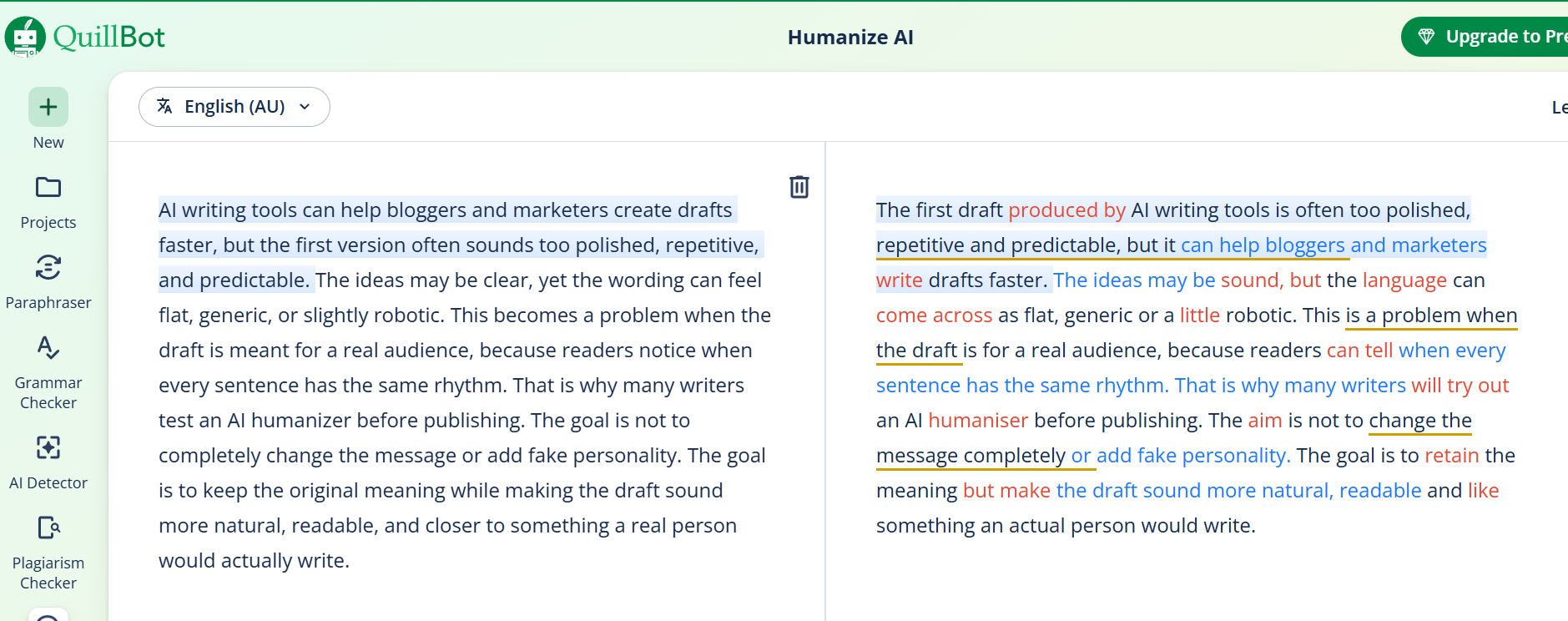
“AI writing tools can help bloggers and marketers create drafts faster, but the first version often sounds too polished, repetitive, and predictable. The ideas may be clear, yet the wording can feel flat, generic, or slightly robotic. This becomes a problem when the draft is meant for a real audience, because readers notice when every sentence has the same rhythm. That is why many writers test an AI humanizer before publishing. The goal is not to completely change the message or add fake personality. The goal is to keep the original meaning while making the draft sound more natural, readable, and closer to something a real person would actually write.”
QuillBot AI Humanizer Output
“The first draft produced by AI writing tools is often too polished, repetitive and predictable, but it can help bloggers and marketers write drafts faster. The ideas may be sound, but the language can come across as flat, generic or a little robotic. This is a problem when the draft is for a real audience, because readers can tell when every sentence has the same rhythm. That is why many writers will try out an AI humaniser before publishing. The aim is not to change the message completely or add fake personality. The goal is to retain the meaning but make the draft sound more natural, readable and like something an actual person would write.”
Sample Rewrite Observation
Test Area | What I Found |
|---|---|
Meaning retention | QuillBot preserved the original meaning well. The main message stayed intact. |
Rewrite depth | The rewrite was conservative. It adjusted sentence order and word choice, but it did not deeply reshape the paragraph. |
Sentence rhythm | The output became slightly smoother, but it still kept a polished and predictable rhythm. |
Naturalness | Some phrases felt more natural, but the first sentence became less direct than the original. |
Best use | Useful for quick polish, short edits, and users already inside QuillBot. |
Main limitation | It did not deeply change the AI-like structure of the paragraph. |
Analysis
QuillBot did what I would expect from a suite-based writing tool. It preserved the meaning and made the draft slightly smoother, but the rewrite stayed close to the original structure.
That is not automatically a weakness. For users who want safe, light cleanup, QuillBot works. But if the goal is stronger sentence movement, more natural rhythm, and deeper paragraph-level refinement, this output feels too conservative.
The biggest issue is the first sentence. QuillBot changed the order, but the result became less direct: “The first draft produced by AI writing tools is often too polished...” is readable, but it feels more formal and less natural than a human editor might write it.
Test Verdict
QuillBot AI Humanizer is useful for light cleanup, especially for existing QuillBot users. In this sample, it worked more like a conservative polish tool than a deep AI humanizer. I would use it for short edits, but not as my first choice for deeper rewriting or long-form AI text refinement.
5. QuillBot Pricing Plan
Evaluation Dimensions: I looked at QuillBot’s current public pricing, what the AI Humanizer free tier actually allows, and whether Premium makes sense if you mainly care about humanization rather than the full QuillBot suite.
Plan | Price | AI Humanizer Access | Best For |
|---|---|---|---|
Free | $0 | Basic Humanize, up to 125 words per input, 6 uses/day after login. In my manual test, QuillBot also allowed one no-login humanization attempt. | Quick testing and very short edits |
Premium | $19.95/month, $13.31/month billed quarterly, or $8.33/month billed annually | Advanced Humanize, no word or usage limits, human score, tone insights, and access to the wider QuillBot suite | Users who already use QuillBot’s full writing toolkit |
QuillBot’s pricing is simple: there is a Free plan and a Premium plan. The Premium plan can be paid monthly, quarterly, or annually, but those are billing options, not separate product tiers.
My take: QuillBot Premium makes the most sense if you already use the wider QuillBot suite, including paraphrasing, grammar checking, summarizing, AI detection, and citation tools. If you only want an AI humanizer, the free tier is too small for serious testing, and Premium may feel like paying for a full bundle when you only need one feature.
6. Pros & Cons of QuillBot AI Humanizer
Evaluation Dimensions: This comparison focuses on the trade-off between suite convenience and dedicated humanization depth.
Pros | Cons |
|---|---|
Very easy to use and familiar for existing QuillBot users. | Free tier is small: 125 words per input and 6 uses/day. |
Works well for light cleanup and readability improvement. | Humanization can feel conservative on complex or long-form drafts. |
Includes access to QuillBot’s broader writing suite. | Best value depends on whether you use the full suite, not only the Humanizer. |
Premium unlocks Advanced Humanize, tone insights, history, and no word/usage limit. | Continued free use required login after the first no-login test in my manual check. |
Summary: QuillBot is a convenient all-in-one writing assistant, especially for users who already like the QuillBot ecosystem. Its weakness is not usability. Its weakness is that the humanization often feels lighter and more conservative than what dedicated refinement-focused tools deliver.
7. Real User Reviews of QuillBot
Public feedback around QuillBot is generally stronger than many smaller AI writing tools. On Trustpilot, users often praise its ease of use, writing support, and general product experience. One reviewer said QuillBot makes their work easier and gives several options, although it can sometimes change the original intent. Another content writer said QuillBot helps with multiple editing tasks without leaving the app.
On G2, a verified user described QuillBot as helpful and easy to use for grammar checking, rephrasing, humanizing, summarizing, and correcting grammar mistakes. The same review also pointed out a limitation: pricing structure and word limits can make longer content harder to handle.
Third-party reviews show a similar pattern. Quetext’s QuillBot AI Humanizer review describes QuillBot as useful for context-preserving paraphrasing and tone refinement, but better as part of a broader workflow than as a complete one-stop humanization solution.
That matches my own test. QuillBot is not a weak tool. It is convenient, polished, and easy to use. But as a dedicated AI humanizer, it feels more useful for light refinement than for deeper rewriting.
8. When QuillBot AI Humanizer Is Not Enough
QuillBot AI Humanizer works best when you need quick polish inside a broader writing suite. That is its real strength. It is easy to access, familiar for existing QuillBot users, and useful for short inputs.
The limitation shows up when you need more than light cleanup. In my test, QuillBot preserved the meaning well, but the rewrite stayed close to the original structure. For longer drafts, the free 125-word limit also makes it hard to test a full paragraph or article section comfortably.
So the better question is not “Is QuillBot bad?” It is: what should you use if you need a more focused AI humanizer with more room for sentence- and paragraph-level refinement?
That is where GPTHumanizer AI fits better. It is not trying to replace QuillBot’s full writing suite. It is more focused on refining AI-assisted drafts so they sound clearer, smoother, and more natural while preserving the original meaning.
Category | QuillBot AI Humanizer | GPTHumanizer AI |
|---|---|---|
Main product type | AI Humanizer inside a broader writing suite | Focused AI writing refinement tool |
Best for | Existing QuillBot users, short edits, and light polish | Bloggers, marketers, SEO teams, and business writers refining AI-assisted drafts |
Free access | One no-login test in my manual check; continued free use required login and 125-word limit | Lite is free to use with no sign-up |
Rewrite style | Conservative, polished, and meaning-safe | More focused on flow, clarity, readability, and sentence-level movement |
Best value if | You use the full QuillBot suite | Your main goal is AI text refinement |
Main limitation | Free tier is small; output can stay close to the original | More specialized, not a broad writing suite |
My take: choose QuillBot if you already use its full writing toolkit and only need light polish. Choose GPTHumanizer AI if your main goal is to refine AI-generated text more deeply and make it sound clearer, smoother, and more natural.
9. Final Verdict of QuillBot Review
QuillBot AI Humanizer is a useful tool, especially if you already use QuillBot for paraphrasing, grammar, summarizing, or citation support. It is easy to access, simple to understand, and good enough for light cleanup.
The limitation is depth. In my test, QuillBot preserved meaning and improved readability, but the output stayed close to the original structure. That makes it a reasonable option for quick polish, not the strongest choice for deeper AI text refinement.
My verdict is simple: choose QuillBot AI Humanizer if you want convenience inside the QuillBot ecosystem. Choose GPTHumanizer AI if your main goal is focused AI writing refinement with smoother flow, clearer phrasing, and more natural sentence movement.
10. FAQ About QuillBot AI Humanizer
Q: Is QuillBot AI Humanizer free to use?
A: Yes, but the free version is limited. In my manual test, QuillBot allowed one no-login humanization attempt. Continued free use required login and was limited to 125 words per input, 6 uses/day.
Q: What is the QuillBot AI Humanizer free limit?
A: QuillBot’s free Humanizer supports up to 125 words per input and 6 uses/day. This is enough for quick testing, not long-form editing.
Q: How much does QuillBot AI Humanizer cost?
A: QuillBot has a Free plan and a Premium plan. Premium costs $19.95/month, $13.31/month when billed quarterly, or $8.33/month when billed annually. Premium unlocks Advanced Humanize and humanizing without word or usage limits.
Q: Is QuillBot AI Humanizer effective?
A: It is effective for light cleanup and readability improvement. In my test, it kept the meaning well but stayed close to the original structure, so I would not call it the strongest option for deeper rewriting.
Q: Is QuillBot Premium worth it for AI Humanizer?
A: QuillBot Premium is worth it if you use the full suite, including paraphrasing, grammar, AI detection, summarizing, and citation tools. If you only need AI humanization, a focused refinement tool may be a better fit.
Q: What is the best QuillBot AI Humanizer alternative?
A: GPTHumanizer AI is a better fit if you mainly want to refine AI-generated text so it sounds clearer, smoother, and more natural while preserving the original meaning.

Related Articles
HIX Bypass Pricing Explained: Is It Worth Paying For in 2026?
A practical look at HIX Bypass pricing, paid-plan value, word limits, refund terms, and whether it i...
 Ethan Miller
Does Hixbypas Work in 2026? Fast, and Aggressive Modes Tested
Does Hixbypas, or HIX Bypass, actually work? I tested Fast and Aggressive modes to compare rewrite q...
Ethan Miller
Best HIX Bypass Alternative: Free, No-Sign-Up AI Humanizer Compared
Looking for a HIX Bypass alternative? Compare HIX Bypass with GPTHumanizer for free access, no-sign-...
Ethan Miller
StealthGPT AI Review 2026: Features, Pricing, Output Quality, and Alternatives
I reviewed StealthGPT AI across pricing, features, rewrite quality, and real writing use cases. See ...
Ethan Miller