
Phrasly AI Review 2026: Pricing, Free Trial, Cancellation & Test Results

Summary
Phrasly AI is an all-in-one AI writing suite with an AI Humanizer, AI Detector, Content Generator, Pages editor, and Plagiarism Checker. It requires login to use, and my free dashboard showed a 300 AI words limit.
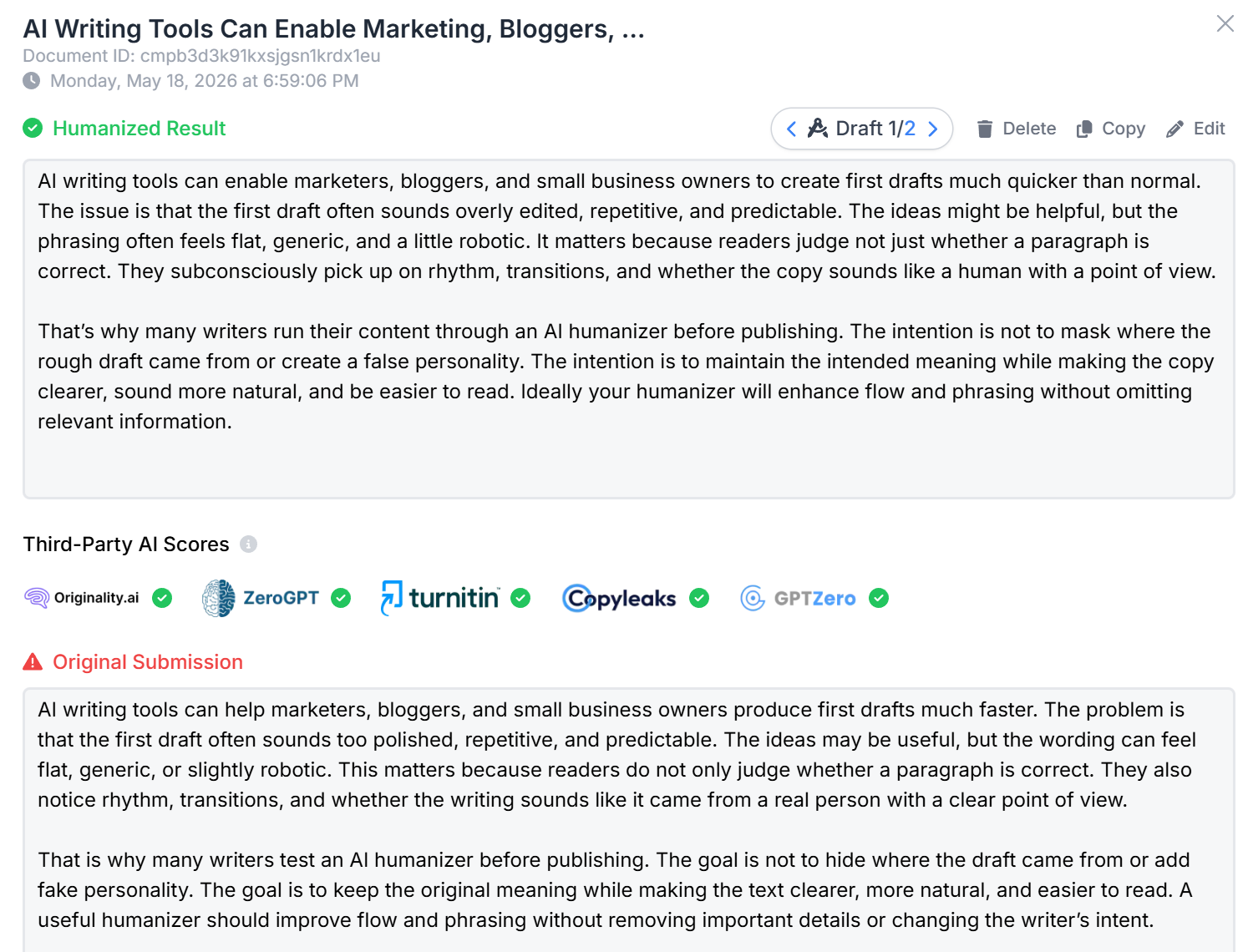
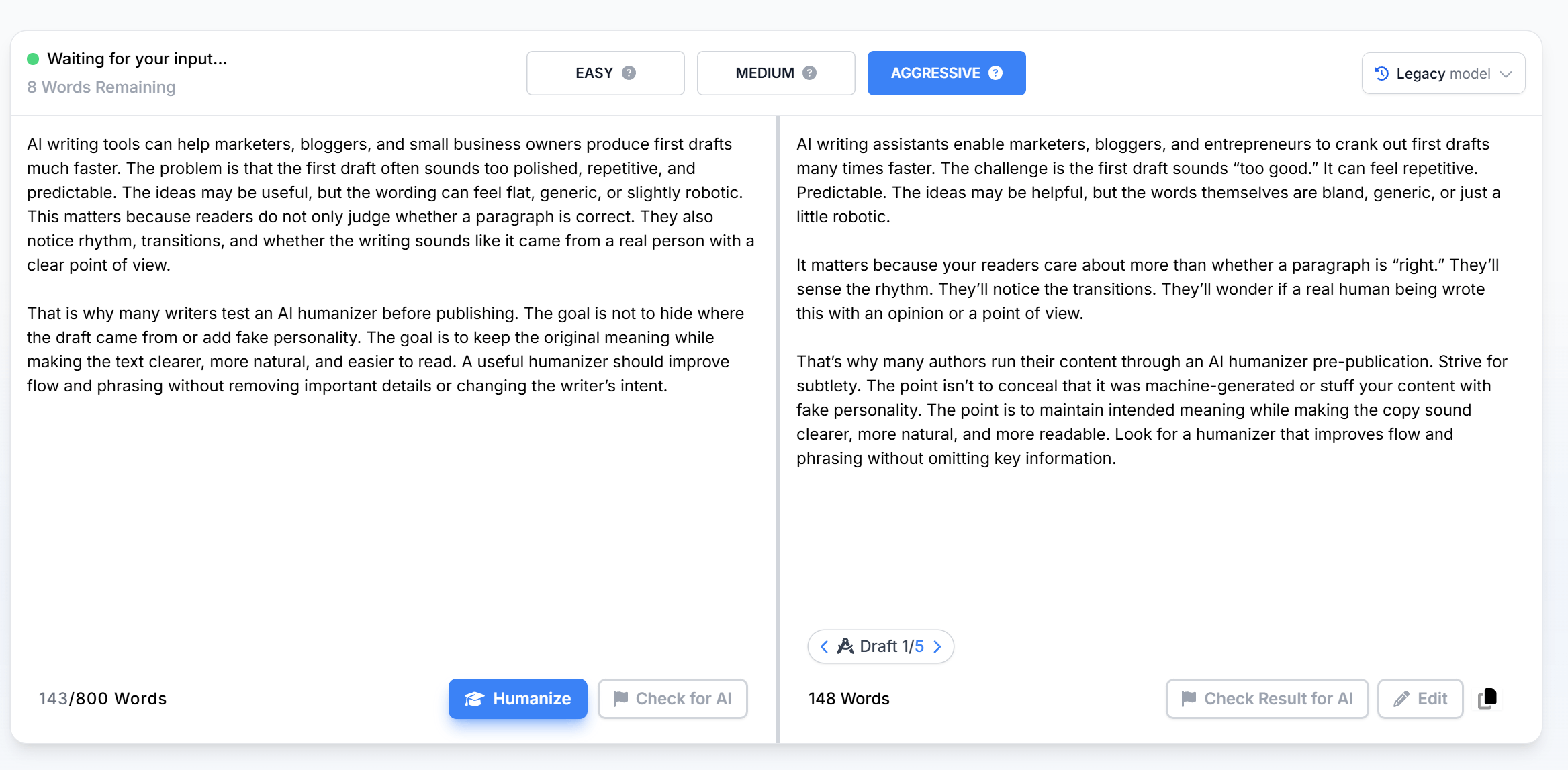
In my hands-on test, Phrasly’s Medium mode preserved the original meaning but still produced some awkward phrasing. Aggressive mode created more sentence movement and a more conversational rhythm, but it also changed tone more strongly and introduced wording I would manually edit.
The current pricing screen shows a $2 3 Day Access option and an Unlimited plan. Monthly billing shows Unlimited at $20/month, while annual billing shows Unlimited at $10.99/month billed annually. The annual plan is cheaper, but users should understand the full-year commitment and cancellation rules before paying.
Public reviews are mostly positive around ease of use and writing support, but billing, refund, and output consistency complaints are real enough to mention.
My verdict: Phrasly AI is worth testing if you want a broad writing suite with multiple rewrite modes. But it is not a tool I would use without a final human review, especially on Aggressive mode or important content.
1. What Is Phrasly AI?
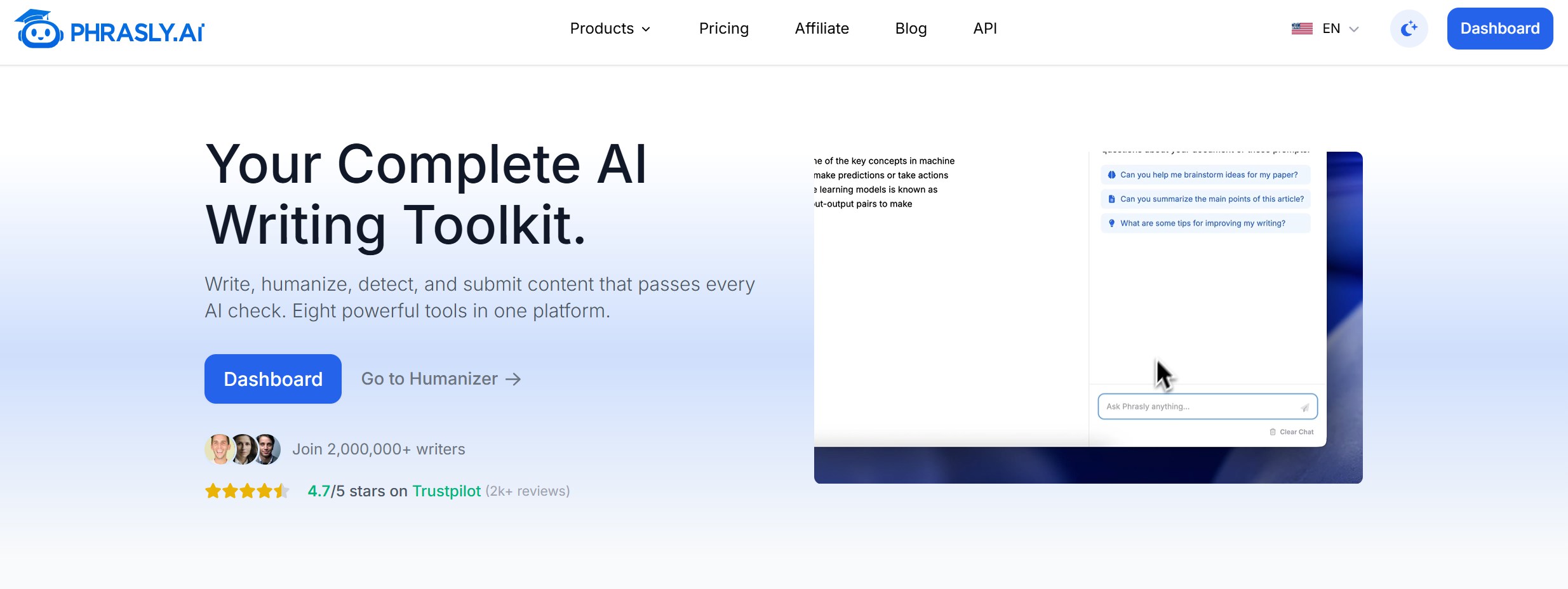
Phrasly AI is an all-in-one AI writing platform built around AI humanization, AI detection, content generation, document editing, and plagiarism checking. In the current dashboard I tested, the main tools were AI Humanizer, AI Detector, Content Generator, Pages, and Plagiarism Checker.
The product is not just a simple AI humanizer. It is closer to a writing workspace for users who want to generate, rewrite, check, and edit content in one place.
If you are comparing Phrasly with other tools, I also included it in my broader AI humanizer comparison for 2026, where it sits alongside GPTHumanizer AI, QuillBot, WriteHuman, HIX Bypass, and other popular options.
My main question in this review is simple: does Phrasly’s humanizer actually improve AI-assisted writing enough to justify its pricing and subscription workflow?
2. Phrasly AI Core Features
Evaluation Dimensions: I looked at the features that matter most for real users: humanization depth, writing workflow, free access, content generation, checking tools, and whether the dashboard feels practical.
Feature | What It Does | My Take |
|---|---|---|
AI Humanizer | Rewrites AI-assisted text with different rewrite strengths. | This is the main feature to test. Medium and Aggressive modes behaved very differently in my sample. |
AI Detector | Checks whether text appears AI-generated. | Useful as a feedback signal, but detector results should not be treated as proof or a guarantee. |
Content Generator | Creates drafts such as papers, articles, letters, and other written content. | Helpful if you want a broader writing suite, but generated content still needs review. |
Pages Editor | Lets users manage and edit documents inside Phrasly. | Useful for users who want one dashboard instead of copying text between tools. |
Plagiarism Checker | Checks text against potential matching content. | Adds value for content review, but it should not replace proper sourcing and editorial checks. |
Free Dashboard Limit | My free account showed a 300 AI words limit. | Enough to preview the interface, but too small for serious long-form testing. |
Summary: Phrasly’s strongest feature is not one single tool. It is the fact that it combines humanization, detection, writing, document editing, and plagiarism checking in one workspace. The trade-off is that users still need to test whether the humanized output is consistent enough for their own writing needs.
3. Who Should Use Phrasly AI?
Phrasly AI is best for users who want a broad writing toolkit instead of a single-purpose AI humanizer.
Best For:
Bloggers and marketers who want to generate, rewrite, and check drafts in one place.
Users who want multiple humanization modes and are willing to review the final output manually.
Content teams that need a dashboard for humanization, detection, content generation, document editing, and plagiarism checking.
Users who are comfortable with a login-based workflow and want to test a suite before paying.
Not Ideal For:
Users who want repeated no-login access.
Users who only need a simple free AI humanizer for quick edits.
Users who expect the strongest rewrite mode to produce final-ready text without manual review.
Users who do not want to manage trial-to-subscription billing carefully.
4. Real Humanization Test of Phrasly AI
Test Setup
I tested Phrasly AI with a blog-style sample about AI writing tools, marketers, bloggers, and humanizing AI-assisted drafts before publishing. I used the same input in two modes: Medium and Aggressive.
I looked at four things: meaning retention, rewrite depth, sentence rhythm, and whether the output felt ready to use after a human review.
Original AI Text
“AI writing tools can help marketers, bloggers, and small business owners produce first drafts much faster. The problem is that the first draft often sounds too polished, repetitive, and predictable. The ideas may be useful, but the wording can feel flat, generic, or slightly robotic. This matters because readers do not only judge whether a paragraph is correct. They also notice rhythm, transitions, and whether the writing sounds like it came from a real person with a clear point of view.
That is why many writers test an AI humanizer before publishing. The goal is not to hide where the draft came from or add fake personality. The goal is to keep the original meaning while making the text clearer, more natural, and easier to read. A useful humanizer should improve flow and phrasing without removing important details or changing the writer’s intent.”
Medium Mode Output
Aggressive Mode Output
Sample Rewrite Observation
Test Area | Medium Mode | Aggressive Mode | My Take |
|---|---|---|---|
Meaning retention | Mostly preserved the original meaning. | Mostly preserved the main idea, but added stronger wording. | Medium is safer if meaning stability matters most. |
Rewrite depth | Light-to-moderate rewriting. | Much stronger rewriting with more sentence movement. | Aggressive feels more human-edited, but less controlled. |
Sentence rhythm | Slightly smoother, but still predictable. | More varied rhythm, including shorter sentences. | Aggressive improves rhythm more clearly. |
Naturalness | Clear, but some phrasing still felt awkward. | More conversational, but some phrases felt over-edited. | Neither output is final-ready without review. |
Main issue | Awkward phrasing in a few places. | Tone drift and added phrasing not present in the original. | Mode choice matters more than Phrasly’s marketing suggests. |
Test Verdict
Phrasly AI did improve the sample, but the result depended heavily on the mode. Medium mode was safer and closer to the original, but it still produced some awkward phrasing. Aggressive mode created more natural rhythm and stronger sentence movement, but it also changed the tone more and introduced wording I would manually edit.
My practical verdict is that Phrasly can be useful as a first-pass AI humanizer, especially if you want different rewrite intensity options. But I would not publish the output without review. The strongest mode is not automatically the best mode; it depends on whether you care more about meaning stability or stronger stylistic change.
5. Phrasly AI Pricing Plan
Phrasly AI uses a trial-to-subscription pricing model. In my manual check, Phrasly required login to use the product, and the free account dashboard showed a 300 AI words limit. That makes the free version useful for a quick look, but not enough for repeated testing or longer drafts.
Based on the latest pricing screen on May 2026, Phrasly currently shows two main paid options: 3 Day Access and Unlimited.
Plan | Monthly billing | Annual billing | Key limits and features |
|---|---|---|---|
Free account | $0 | $0 | Login required; 300 AI words limit shown in my dashboard. |
3 Day Access | $2 trial, then $39.99/month after trial | $2 trial, then $19.99/month billed annually | 800 words per process, up to 6,000 content generator words, limited trial-style access. |
Unlimited | $20/month | $10.99/month billed annually | Unlimited AI humanizations, 20,000 plagiarism check words/month, up to 30,000 content generator words/month, 5,000 words per process. |
The Unlimited annual plan is clearly the most aggressively discounted option. At $10.99/month billed annually, it looks much cheaper than monthly billing. But users should remember that annual billing means committing to a full-year payment, not simply paying month by month.
My take: Phrasly’s pricing can make sense if you already know you want an all-in-one writing suite. But because the free account limit is small and the 3 Day Access plan can convert into a paid subscription, I would test the output carefully and understand the cancellation terms before paying.
6. How to Cancel a Phrasly AI Subscription
Phrasly cancellation matters because the paid workflow includes trial access and subscription billing. If you are testing Phrasly only briefly, do not wait until the last minute to manage your subscription.
According to Phrasly’s terms, users can cancel by logging into their account, going to the Settings page, and selecting the Billing section.
If you cancel during the trial, the trial benefits end immediately and you should not be charged the subscription fee. The $2 trial fee is non-refundable. If you cancel a paid subscription, access continues until the end of the current paid billing period, and no partial-period refund is issued.
One important detail is the Paddle billing window. Phrasly’s terms say Paddle locks upcoming renewal or trial-end charges about 30 minutes before processing, so cancellation requests need to be submitted at least 30 minutes before the next scheduled renewal or trial-end charge.
Refunds are also restrictive. Phrasly’s terms describe a 14-day refund policy, but only if there has been no usage on the account at all. That means no processed documents, no API calls, and no use of any feature.
My advice: if you only want to test Phrasly, use the free account limit first, read the trial terms before starting 3 Day Access, and cancel early if you do not plan to continue. Keep a screenshot or confirmation email after cancellation.
7. Real User Reviews of Phrasly AI
Public feedback around Phrasly AI is mostly positive, but the full picture is more mixed than the rating alone suggests.
On Trustpilot, Phrasly currently has a strong overall rating and thousands of reviews. Positive reviewers often praise the simple interface, fast workflow, and rewriting quality. One Trustpilot reviewer said Phrasly helps make sentences clearer and more natural without changing the original meaning. Another reviewer said it “humanizes the content pretty well,” though not perfectly.
The negative feedback is mostly about billing, refund, and support experiences. On Trustpilot, one reviewer complained about being moved into a yearly service and not receiving a refund. In a Reddit refund discussion, a user claimed they used the service once for testing and were later refused a refund. A Reddit billing discussion also includes complaints about trial cancellation and unexpected charges.
Third-party testing is mixed as well. Originality.ai’s Phrasly review focuses on whether Phrasly’s humanizer can make AI-generated text appear more human-like across detectors. StealthGPT’s Phrasly test reported that Phrasly passed only part of its detector test set and struggled with tougher checks.
My take: Phrasly AI is not a fake or low-quality tool. It has many positive users and a useful writing workflow. But users should test the output carefully, understand the billing model, and avoid assuming that every humanized draft will be ready to publish without review.
8. When Phrasly AI May Not Be Enough
Phrasly AI is useful if you want a broad writing suite with a humanizer, detector, content generator, Pages editor, and plagiarism checker in one dashboard. It gives users more than one rewrite mode, and that flexibility is helpful.
The trade-off is consistency. In my test, Medium mode was safer but still needed cleanup, while Aggressive mode improved rhythm but changed tone more strongly. Phrasly also requires login, has a small free word limit, and uses a trial-to-subscription pricing model that users should understand before paying.
If your main goal is a full writing toolkit, Phrasly AI may be a fair option. If your main goal is focused AI text refinement, GPTHumanizer AI is a more direct fit. It is designed around improving flow, clarity, readability, and natural phrasing while keeping the original meaning intact.
Category | Phrasly AI | GPTHumanizer AI |
|---|---|---|
Main product type | All-in-one AI writing suite | Focused AI writing refinement tool |
Best for | Users who want humanizer, detector, generator, Pages, and plagiarism tools together | Bloggers, marketers, SEO teams, and business writers refining AI-assisted drafts |
Free access | Login required; 300 AI words shown in my free dashboard | Lite is free to use with no sign-up |
Rewrite style | Multiple modes; Medium is safer, Aggressive is stronger but less controlled | Focused on natural flow, clarity, readability, and sentence-level refinement |
Main limitation | Output consistency and billing/cancellation clarity need attention | More specialized, not a broad writing suite |
My take: choose Phrasly AI if you want a broader toolkit and are comfortable testing the output carefully. Choose GPTHumanizer AI if you mainly want a focused tool for refining AI-generated text into clearer, smoother, more natural writing.
9. Final Verdict: Is Phrasly AI Worth It?
Phrasly AI is worth testing if you want an all-in-one AI writing suite with humanization, detection, content generation, document editing, and plagiarism checking in one place. It is a real product, and in my test, both Medium and Aggressive modes changed the draft in noticeable ways.
But I would not describe the output as publish-ready without review. Medium mode was safer but still awkward in places. Aggressive mode had better rhythm, but it also changed tone more strongly and introduced wording I would edit before publishing.
The pricing is also something to read carefully. The free dashboard limit is small, the 3 Day Access plan can convert into a paid subscription, and the annual Unlimited plan is cheaper but requires a longer commitment.
My verdict is simple: use Phrasly AI if you want a broad writing toolkit and are willing to review the output yourself. Choose a more focused AI humanizer if your main goal is cleaner sentence- and paragraph-level refinement without paying for a larger writing suite.
10. FAQ About Phrasly AI
Is Phrasly AI free?
Phrasly requires login to use. In my manual check, the free dashboard showed a 300 AI words limit. That is enough for a quick preview, but not enough for serious testing or longer drafts.
How much does Phrasly AI cost?
Based on the latest pricing screen, Phrasly shows a $2 3 Day Access option and an Unlimited plan. Monthly billing shows Unlimited at $20/month, while annual billing shows Unlimited at $10.99/month billed annually.
What is Phrasly 3 Day Access?
Phrasly’s 3 Day Access is a $2 trial-style option. In the latest pricing screen, monthly billing shows it converting to $39.99/month after trial, while annual billing shows $19.99/month billed annually after trial.
How do I cancel a Phrasly subscription?
Log in to your Phrasly account, go to Settings, and open the Billing section. Phrasly’s terms say trial cancellation takes effect immediately, while paid subscription cancellation takes effect at the end of the current billing period.
Can I get a Phrasly refund?
Phrasly’s terms describe a 14-day refund policy, but only if there has been no usage on the account at all. Any document processing, API call, or use of features can void refund eligibility.
Does Phrasly AI require login?
Yes. In my manual test, Phrasly required login before I could use the dashboard and AI Humanizer.
Does Phrasly AI have a translator?
Phrasly lists Translator in its product navigation, but I did not see a standalone Translator tool in the current dashboard screenshot I tested. I would not treat translation as the main reason to pay for Phrasly unless you can access that feature directly in your account.
Is Phrasly AI Humanizer good?
Phrasly AI Humanizer is useful, but mode choice matters. Medium mode is safer and closer to the original meaning, while Aggressive mode creates more sentence movement but can change tone more strongly.
Is Phrasly AI worth it?
Phrasly AI is worth testing if you want a broad writing suite. I would be more cautious if you only need a focused AI humanizer, because the free limit is small and the paid workflow includes trial and cancellation terms you should understand first.
What is the best Phrasly AI alternative?
GPTHumanizer AI is a better fit if you mainly want focused AI text refinement. It is designed to improve flow, clarity, readability, and natural phrasing while keeping the original meaning intact.

Related Articles

HIX Bypass Pricing Explained: Is It Worth Paying For in 2026?
A practical look at HIX Bypass pricing, paid-plan value, word limits, refund terms, and whether it i...
 Ethan Miller
Does Hixbypas Work in 2026? Fast, and Aggressive Modes Tested
Does Hixbypas, or HIX Bypass, actually work? I tested Fast and Aggressive modes to compare rewrite q...
Ethan Miller
Best HIX Bypass Alternative: Free, No-Sign-Up AI Humanizer Compared
Looking for a HIX Bypass alternative? Compare HIX Bypass with GPTHumanizer for free access, no-sign-...
Ethan Miller
StealthGPT AI Review 2026: Features, Pricing, Output Quality, and Alternatives
I reviewed StealthGPT AI across pricing, features, rewrite quality, and real writing use cases. See ...
Ethan Miller