
Ghost AI Review 2026: Pricing, Free Trial, Output Quality, and Verdict

Summary
| Review Point | Ghost AI Result |
|---|---|
Free access | Can be used directly; free trial around 500 words |
Tested mode | Medium mode |
Pricing | Personal plan shown at $9/month |
Best test result | Short work email |
Weakest test result | Blog-style and formal explanatory text still showed high AI signals in GPTZero |
Main strength | Clean interface and readable short-form rewrites |
Main weakness | Inconsistent output quality and mixed detector signals |
Final verdict | Worth testing for short rewrites, but not enough to trust without human review |
Disclaimer: This review is based on my personal hands-on testing of Ghost AI’s 2026 version. I am not affiliated with Ghost AI. I aim to provide an honest, experience-based breakdown of how this tool functions in real-world scenarios.
What Is Ghost AI?
Ghost AI is a web-based humanization platform that rewrites AI-generated text into more natural-sounding content. In my test, I could use the humanizer directly without logging in, but the free trial was short and stopped at roughly 500 words.
To be honest, the first thing I noticed was the interface. It’s clean, minimal, and modern. Like GPTHumanizer AI, it positions the toolbar and input box right on the homepage, which looks promising. However, you have to register an account before you can even touch the "Humanize" button. It positions itself as an all-in-one suite for rewriting and checking text, aiming to solve the problem of robotic, stiff AI drafts.
Ghost AI's Core Features
The tool offers three distinct "humanize" strengths and an adjustable tune, but the free utility is less transparent than it seems.
Adjustable Humanization Levels: Ghost AI offers three intensity settings. You can toggle between them to choose how aggressively the AI rewrites your text.
Tone Tuning: Similar to other tools, you can select different "tunes" or tones. However, I found that the specific distinct tones are locked behind the paid subscription.
AI Essay Writer: Ghost AI also includes an AI Essay Writer module designed to generate longer drafts from a prompt. I would treat this as a separate writing feature rather than the main focus of this review, because my hands-on test focused on the Humanizer output quality.
Built-in AI Detector: Ghost AI includes an AI detector that can check text before or after rewriting. I would treat this as a reference signal, not proof, because detector results can vary across tools and samples.
Who Should Use Ghost AI?
Ghost AI is best for users who want a quick rewriting tool for short drafts and are willing to review the output manually. It is not the tool I would use as a one-click final editor.
It is a good fit for:
Short work messages that need a smoother tone
Simple blog or marketing drafts that need lighter rewriting
Users who want to test a humanizer quickly without a long setup process
People who care more about readability than detector scores alone
It is not a good fit for:
Users who need long-form rewrite consistency
Drafts where grammar, meaning, or factual details must be preserved very carefully
Users who want to rely on a detector score as proof of output quality
People who want a long free workflow before paying
Ghost AI Hands-On Test
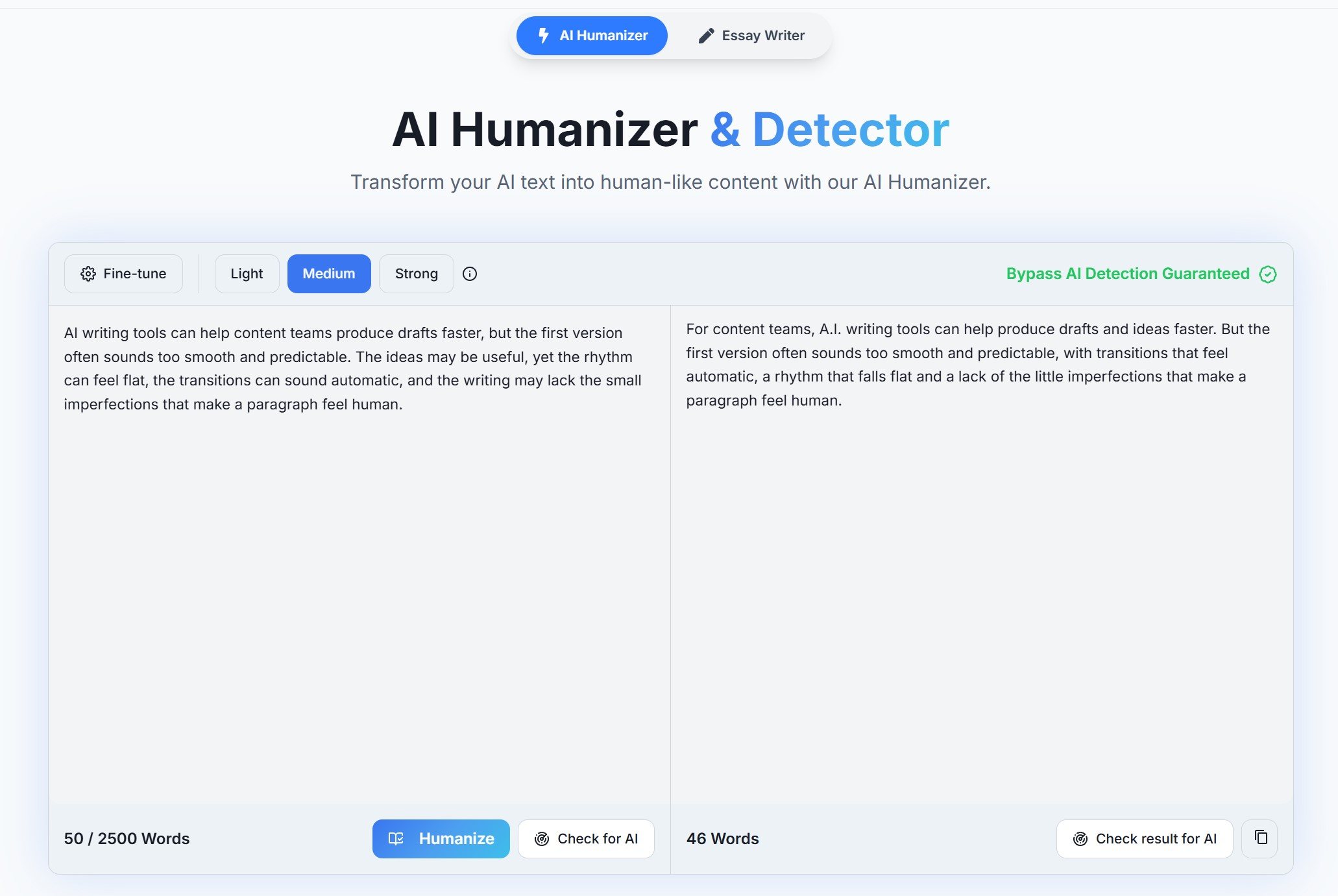
To test Ghost AI more fairly, I used three short samples in Medium mode: a blog-style paragraph, a short work email, and a formal explanatory paragraph. These are common cases where users care about an AI humanizer: improving flow, softening tone, preserving meaning, and avoiding awkward rewrites.
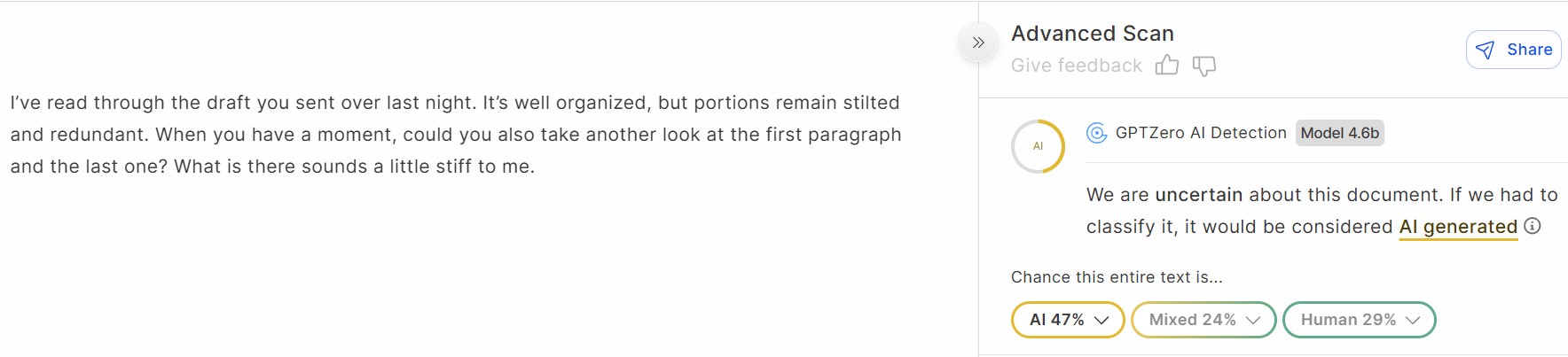
I also checked the rewritten outputs with GPTZero, but I did not treat the detector score as the final verdict. For this review, the more important question was whether the output became clearer, more natural, and still faithful to the original message.
Test Dimension | Why It Matters | Ghost AI Medium Mode Result | My Take |
|---|---|---|---|
Meaning retention | A humanizer should not change the core message. | Mostly good | Ghost AI generally kept the main ideas intact across the three samples. |
Readability | Users want smoother, easier-to-read output. | Good | The rewrites were readable and usually cleaner than a rough AI draft. |
Natural tone | The output should sound like something a person would write. | Mixed | The short email sounded more natural, but the blog-style and formal samples still felt somewhat mechanical. |
Rewrite depth | A useful humanizer should improve rhythm and structure, not only rephrase. | Moderate | Ghost AI changed wording and sentence flow, but it did not always create a clearly more human rhythm. |
Grammar and sentence quality | The rewrite should not introduce awkward or unclear phrasing. | Mostly acceptable | The output was cleaner than some weaker humanizers, but still needed a final human edit. |
Detector signal | Detector scores can show patterns, but they are not proof. | Inconsistent | GPTZero marked the blog-style sample as 100% AI, the email as 47% AI, and the formal explanatory sample as 94% AI. |
Best-performing sample | Shows where the tool works best. | Short work email | Ghost AI was strongest when softening a simple message. |
Weakest-performing sample | Shows where the tool is less reliable. | Blog-style and formal explanatory text | These samples remained highly AI-signaled in GPTZero and still felt somewhat structured. |
Editing required | Real value depends on how much cleanup remains. | Moderate | I would not use the output as final without review. |
Test Takeaway
Ghost AI’s Medium mode worked best on the short work email. That output sounded smoother and less stiff, and GPTZero returned a lower AI signal than the other two samples.
The blog-style paragraph and formal explanatory paragraph were less convincing. They were readable, but GPTZero still marked them as highly AI-written: 100% AI for the blog-style sample and 94% AI for the formal explanatory sample. I would not treat that as final proof that the writing is bad, but it does show that Ghost AI’s output can still carry strong AI-like patterns.
My overall view is that Ghost AI can improve flow and readability, especially on short messages. But it is not consistently strong enough to use as a one-click final editor. The output still needs human review for rhythm, clarity, and sentence quality.
Ghost AI Pricing Plan
Ghost AI’s pricing is simpler than the old version of this article suggested. In the pricing page I checked, the Monthly view showed a Personal plan at $9/month.
The Personal plan includes:
Unlimited words per month
AI Humanization
AI Detection
24/7 support
Ghost AI also offers API pricing for users who need larger token or word packages:
API Package | Price |
|---|---|
100,000 words | $20 |
1,000,000 words | $150 |
10,000,000 words | $1,000 |
The pricing itself is not complicated. The bigger issue is the short free trial. In my test, Ghost AI allowed roughly 500 words before paid access became relevant. That is enough for a quick first impression, but not enough to judge long-term output consistency.
My take: $9/month for unlimited words can look attractive if you already like Ghost AI’s output style. But based on my Medium mode test, I would not pay only because the plan says “unlimited.” The real question is whether the tool saves enough editing time across the kind of writing you actually use.
If you are comparing Ghost AI with other paid AI humanizers before subscribing, I included it in this broader paid-tool review: which paid AI humanizers are actually worth paying for.
Pros & Cons of Ghost AI
Ghost AI has a clean interface and usable rewriting quality, but the short free trial and inconsistent detector signals make it harder to judge before paying.
Pros
Clean and simple interface
Can be used directly for a short free test
Roughly 500 free words in my test
Medium mode worked well on a short work email
Generally preserved the main meaning
Personal plan is simple at $9/month for unlimited words
Cons
Free trial is too short for serious evaluation
GPTZero results were inconsistent across samples
Blog-style and formal explanatory text still showed high AI signals
Output still needs manual review
Built-in detector feedback should not be treated as proof
Not strong enough to rely on as a one-click final editor
Real User Reviews of Ghost AI
I could not find enough strong Trustpilot or G2 review data to treat public ratings as the main evidence for this review. So I used external reviews and community discussions only as supporting context, not as the final verdict.
That matters because Ghost AI’s value is best judged by actual output quality. My own Medium mode test is more useful than a broad claim that any humanizer always works or never works.
“Text humanized by Ghost AI Humanizer still gets flagged as likely AI by Originality.ai, defeating its core purpose.” – Originality.ai review (detailed detector comparison). The Ghost AI Humanizer: Is it Detectable? – Originality.AI
“Ghost AI’s humanizer made unnecessary weird substitutions, or restructured sentences that felt awkward.” – Good AI review referencing Ghost AI. Good AI Review: Is It Really As Smart As It Claims?
Community Insight: Many AI humanizers fail to reliably pass detectors and often produce text that still feels unnatural or awkward. Users trying multiple tools (including Ghost AI) report similar outcomes — most humanizers don’t work as advertised. Reddit
When a Ghost AI Alternative Makes More Sense
Ghost AI may be worth trying if you like its clean interface and want a simple $9/month plan with unlimited words. It is especially reasonable if you mainly rewrite short messages and are comfortable reviewing the output manually.
A Ghost AI alternative makes more sense if you want to test an AI humanizer repeatedly before paying. Ghost AI’s free trial gave me roughly 500 words, which was enough for a first impression but not enough to judge long-term consistency.
This is where GPTHumanizer AI may be a more practical starting point. Its Lite workflow is free to use without signing up, so users can test more drafts before deciding whether they need a paid tool. I would not frame this as “Ghost AI is bad.” The more accurate point is that Ghost AI is useful for quick rewriting, while GPTHumanizer AI is easier to evaluate before paying.
Final Verdict: Is Ghost AI Worth It?
Ghost AI is worth trying if you want a clean, simple tool for quick rewriting. In my test, Medium mode worked best on a short work email, where it made the message smoother and less stiff while keeping the main point clear.
The limitation is consistency. The blog-style paragraph and formal explanatory paragraph were readable, but they still showed high AI signals in GPTZero and did not feel fully natural without review. That does not mean Ghost AI is useless, but it does mean I would not treat the output as ready to use automatically.
The pricing is simple: the Personal plan is shown at $9/month with unlimited words. That can be reasonable if you like Ghost AI’s rewrite style. But because the free trial is only around 500 words, I would test carefully before paying.
My final take: Ghost AI is a decent lightweight rewriting tool, but it is not a fully reliable one-click humanizer. Use it for quick drafts and short messages, but review the output yourself before publishing, sending, or relying on it.
FAQ About Ghost AI
Q: Is Ghost AI free to use?
A: Ghost AI is free only as a short trial. In my test, I could use it directly without logging in, but the free trial stopped at roughly 500 words before paid access became relevant.
Q: How much does Ghost AI cost?
A: Ghost AI’s Personal plan is shown at $9/month and includes unlimited words, AI Humanization, AI Detection, and 24/7 support. It also offers API packages for larger word-volume needs.
Q: Does Ghost AI actually work?
A: Ghost AI can improve flow and readability, especially on short work messages. However, its Medium mode was less consistent on blog-style and formal explanatory text, so the output still needs human review.
Q: Is Ghost AI’s built-in AI detector reliable?
A: Ghost AI’s built-in detector should be treated as a reference signal, not proof. In my test, external GPTZero results varied across samples, so writing quality matters more than one detector score.
Q: Is Ghost AI worth paying for?
A: Ghost AI may be worth paying for if you like its rewrite style and mainly edit short drafts. I would not subscribe based on one 500-word free trial alone.

Related Articles
HIX Bypass Pricing Explained: Is It Worth Paying For in 2026?
A practical look at HIX Bypass pricing, paid-plan value, word limits, refund terms, and whether it i...
 Ethan Miller
Does Hixbypas Work in 2026? Fast, and Aggressive Modes Tested
Does Hixbypas, or HIX Bypass, actually work? I tested Fast and Aggressive modes to compare rewrite q...
Ethan Miller
Best HIX Bypass Alternative: Free, No-Sign-Up AI Humanizer Compared
Looking for a HIX Bypass alternative? Compare HIX Bypass with GPTHumanizer for free access, no-sign-...
Ethan Miller
StealthGPT AI Review 2026: Features, Pricing, Output Quality, and Alternatives
I reviewed StealthGPT AI across pricing, features, rewrite quality, and real writing use cases. See ...
Ethan Miller