
Best Free GPTinf Humanizer Alternative With No Sign-Up: What to Try Before Paying

Summary
GPTHumanizer AI is the stronger free GPTinf alternative for users who want no-sign-up access and a more practical way to humanize real AI drafts before paying. GPTinf is useful as a short preview, but its free allowance is small. In side-by-side testing, GPTHumanizer AI preserved more key details and produced a more natural business-writing style.
- GPTHumanizer AI is the best free GPTinf alternative for no-sign-up use.
It lets users start quickly and test AI humanization without creating an account first.
- GPTinf’s free humanizer access is very limited.
GPTinf offers a small free preview, but longer or repeated testing quickly moves users toward an upgrade decision.
- The side-by-side test favored GPTHumanizer AI.
GPTinf made the sample more formal but removed important details, while GPTHumanizer AI kept the original meaning more intact.
- Meaning preservation matters more than simple rewriting.
A useful AI humanizer should keep key facts, timelines, and intent instead of only changing wording.
- The decision comes down to free access and output quality.
GPTHumanizer AI is stronger here because it is easier to try without sign-up and performed better in the same-text rewrite test.
- GPTinf still makes sense for users who specifically want its workflow.
It may be worth testing if the user is already considering a paid GPTinf plan.
- GPTHumanizer AI is better as the first free option before paying.
It is more practical for users who want to rewrite AI drafts into clearer, more natural text before deciding whether to upgrade any tool.

If you are looking for a free GPTinf alternative, you probably already know the problem: GPTinf gives you a quick preview, but the free humanizer allowance is too small to properly test real writing. Officially, GPTinf offers 120 free words before sign-up and another 120 words after creating a free account. In my test, a longer input also triggered an upgrade prompt.
That is why this comparison is not about listing ten random GPTinf alternatives. It is about one practical question: what should you try before paying for GPTinf? For the full product-level breakdown, including GPTinf’s features, pricing, output quality, and overall verdict, read the full GPTinf review. This article focuses on the free no-sign-up alternative angle.
My pick is GPTHumanizer AI because it is easier to start with, does not require sign-up, and performed better in my side-by-side rewrite test. GPTinf was usable, but GPTHumanizer AI preserved more key details and produced a more natural business-writing style.
Quick Answer: GPTHumanizer AI Is the Best Free GPTinf Alternative to Try First
GPTHumanizer AI is the best free GPTinf alternative if you want no-sign-up access and a more practical way to humanize AI text before paying. It is stronger for users who care about natural flow, meaning preservation, and real draft usability.
GPTinf can still work for a quick preview. The issue is that its free humanizer access is very limited. If you only want to see the interface, GPTinf’s free trial may be enough. If you want to test a real paragraph, compare outputs, and decide whether the rewrite actually improves your text, the free limit becomes frustrating fast.
Question | Direct answer |
|---|---|
Best free GPTinf alternative? | GPTHumanizer AI |
Does it require sign-up? | No |
Best for | Making AI drafts clearer and more natural while preserving meaning |
Why not just use GPTinf free? | GPTinf’s free humanizer allowance is limited |
Main caution | Always review the final output yourself |
Why Users Look for a Free GPTinf Alternative
Most users look for a free GPTinf alternative because they want to test more than a tiny sample before paying. GPTinf is free to try, but its free humanizer allowance works more like a short preview than a real editing workflow.
This is the exact pain point. You do not want to create another account, hit another limit, or pay before you know whether the output is good enough.
GPTinf’s free access is real, but tight. Its official free-plan wording gives users 120 free words before sign-up and 120 more after registration. In my own test, a longer sample above 300 words triggered an upgrade prompt.
That means GPTinf can show you what the tool looks like, but it does not give much room to test different writing styles, longer paragraphs, or meaning preservation. For the full breakdown of the free allowance, login rules, pricing, and upgrade prompt, see Is GPTinf Free? Free Trial, Pricing, Login Rules, and Limits Explained.
GPTinf vs GPTHumanizer AI: Free Access Compared
GPTinf is better if you only want a quick preview of GPTinf’s own workflow. GPTHumanizer AI is better if you want to humanize real AI drafts without signing up first.
Feature | GPTinf | GPTHumanizer AI |
|---|---|---|
No-sign-up access | Yes, but very limited for humanizing | Yes |
Free humanizer use | Official 120 + 120 free words | Free Lite access |
Longer text testing | Upgrade prompt appears quickly | Easier for practical free testing |
Best use case | Previewing GPTinf before upgrading | Making AI drafts clearer and more natural without changing the original meaning |
Main limitation | Free allowance is too small | Output still needs human review |
Better first step? | Good if you only want to test GPTinf | Better if you want a no-sign-up tool first |
This is why I would not frame the choice as “GPTinf is bad, GPTHumanizer AI is good.” The real difference is more practical: how much usable testing room do you get before you have to make a paid decision?
My Test: GPTinf vs GPTHumanizer AI on the Same AI Draft
In my side-by-side test, GPTHumanizer AI produced the stronger output because it preserved key details while making the text sound more natural. GPTinf was usable, but it became more formal and removed important information from the original draft.
For this test, I used a short AI-style paragraph about small businesses using AI to write customer support replies:
Many small business owners use AI tools to write customer support replies, but the first draft often sounds too formal, too vague, or too much like a template. This can be a problem when the message is about a refund request, a delayed shipment, or a frustrated customer who needs a clear answer instead of a polished paragraph.
A good support reply should do more than sound polite. It should explain what happened, confirm the next step, and make the customer feel that a real person has read the issue. For example, if an order is delayed by three business days, the reply should not hide that detail behind general language like “we are experiencing some processing issues.” It should say what the delay is, what the team is doing, and when the customer can expect another update.
AI writing tools can help support teams move faster, but the final message still needs human judgment. The goal is not to make every reply sound perfect. The goal is to make the reply clear, specific, and natural enough that the customer trusts it.
This was a useful test sample because it included details that should not be lost:
refund requests;
delayed shipments;
frustrated customers;
a three-business-day delay;
the need to tell customers when to expect another update.
A good humanizer should not simply make the paragraph different. It should make the writing clearer and more natural while keeping those details intact.
What the Output Test Showed
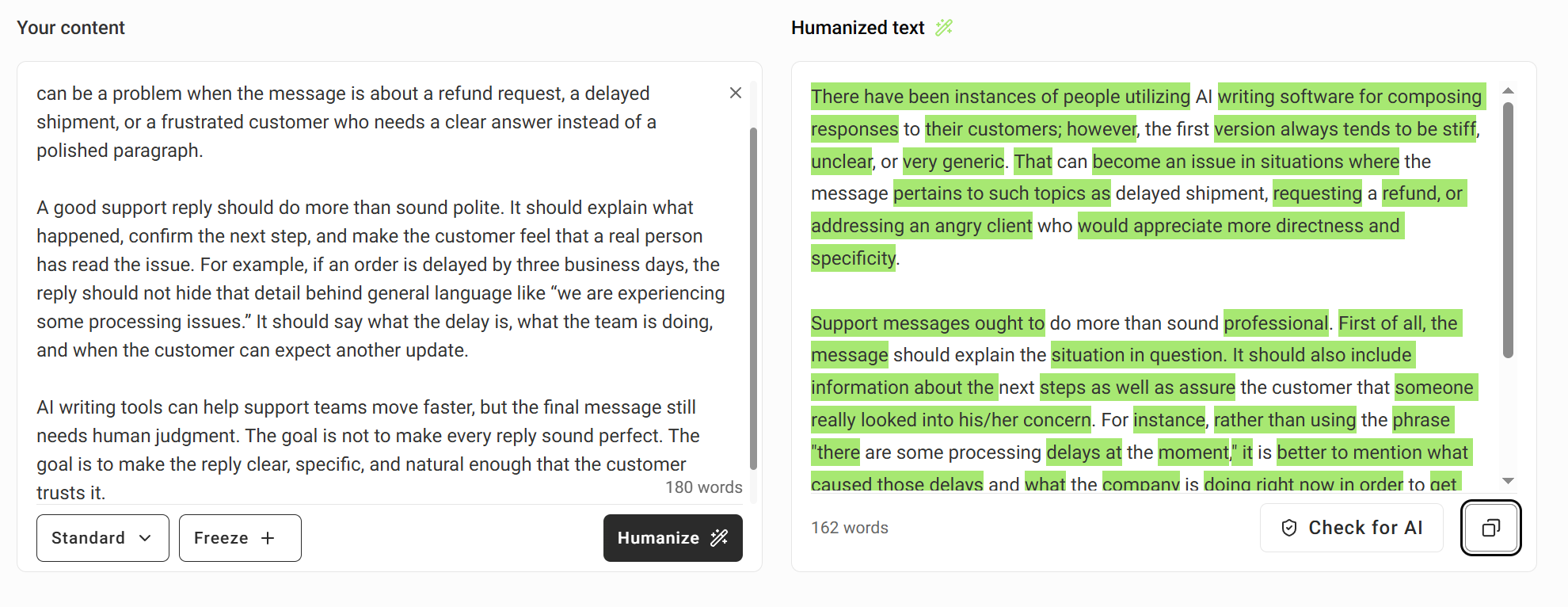
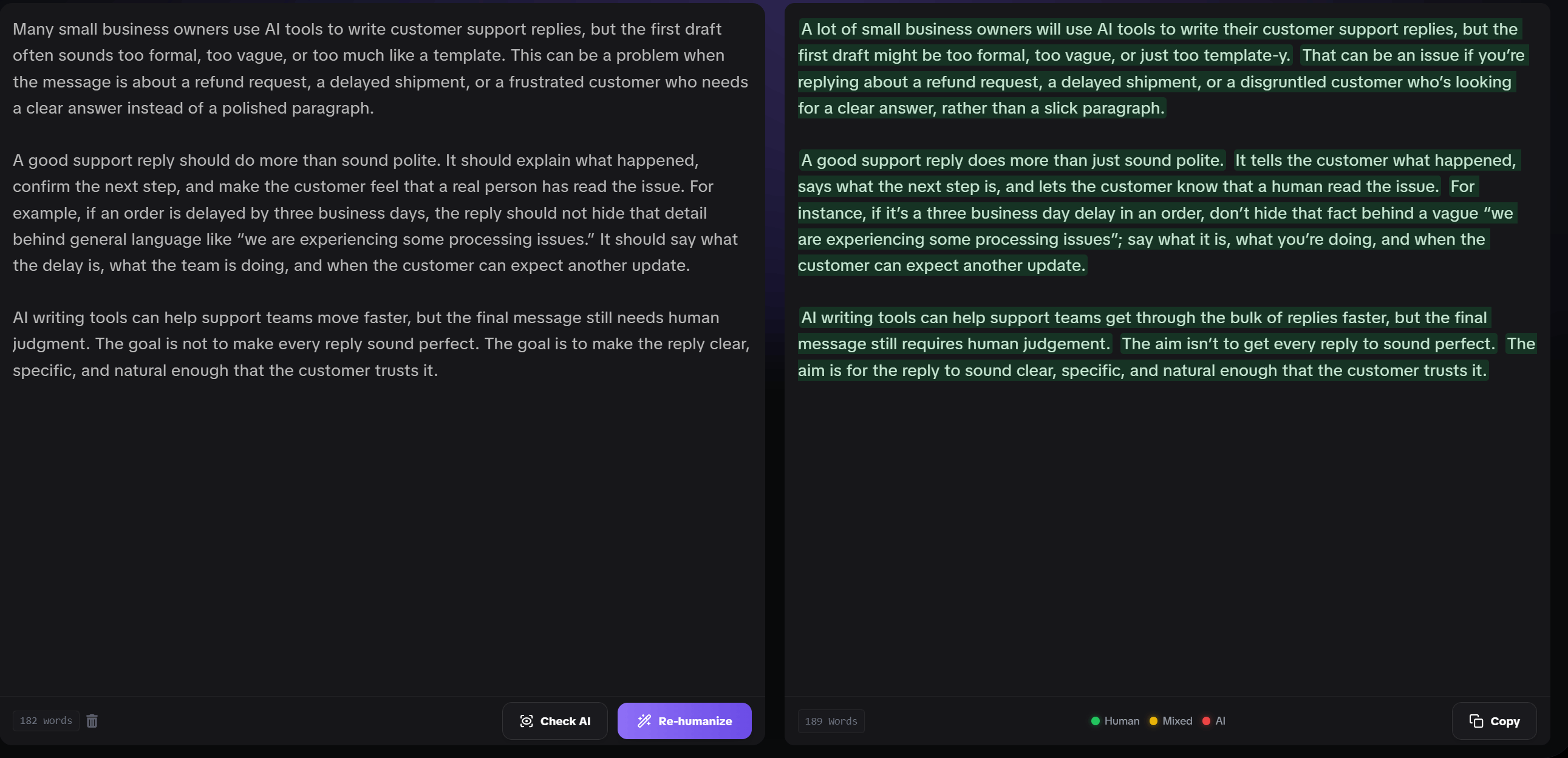
GPTHumanizer AI was better in this test because it kept the original meaning more carefully. GPTinf changed the style, but it also removed details that were important to the customer-support scenario.
GPTinf AI humanizer output:
GPTHumanizer AI humanizer output:
Quality factor | GPTinf result | GPTHumanizer AI result | Better result |
|---|---|---|---|
Natural wording | More formal and slightly stiff | More conversational and readable | GPTHumanizer AI |
Meaning preservation | Removed key details | Kept the main details intact | GPTHumanizer AI |
Specificity | Lost the three-business-day delay and next update timeline | Kept both details | GPTHumanizer AI |
Business-writing fit | Reads more like a formal rewrite | Reads more like practical support-writing advice | GPTHumanizer AI |
Final edit needed | Yes | Yes, but less cleanup needed | GPTHumanizer AI |
The biggest issue with GPTinf’s output was not that it was unreadable. It was that it removed or softened details that mattered. In customer support writing, details like “three business days” and “when the customer can expect another update” are not extra decoration. They are what make the reply useful.
GPTHumanizer AI’s output was not perfect either. I would still do a light human review before publishing. But it kept the original scenario intact, sounded more natural, and needed less cleanup.
The takeaway from this test is not that GPTinf cannot rewrite text. It can. The issue is that its rewrite became more formal and less specific, while GPTHumanizer AI kept the details that made the sample useful. For a free GPTinf alternative, that matters more than a long feature list.
Why GPTHumanizer AI Works Better as a Free First Step
GPTHumanizer AI works better as a free first step because it lets users try a real humanization workflow without signing up, while focusing on naturalness, clarity, and meaning preservation.
The no-sign-up part matters, but it is not the whole value. A free tool is only useful if the output helps.
From this test, GPTHumanizer AI is stronger for users who want to:
make AI text sound less stiff;
preserve the original meaning;
keep important details;
improve readability without over-polishing;
test the tool before committing to a paid plan.
You can try GPTHumanizer AI if you want a free AI humanizer you can start using without creating an account first.
When GPTinf Still Makes Sense
GPTinf still makes sense if you specifically want to test GPTinf’s own humanizer workflow, like its interface, or are already considering one of its paid plans.
I would still try GPTinf if your goal is to evaluate GPTinf itself. Its free preview can be enough for a very short sample, and some users may prefer its workflow.
GPTinf may also make sense if you are already planning to upgrade and only need a quick check before paying. Its paid plans start at $9.99/month on monthly billing, while the yearly option shows a lower effective monthly price starting at $4.99/month. So the decision is less about “Can I try it?” and more about “Is the output worth paying for, especially if I commit to yearly billing?”
When You Should Try GPTHumanizer AI Instead
Try GPTHumanizer AI instead if you want a free no-sign-up humanizer that gives you a more practical starting point for rewriting AI text.
GPTHumanizer AI is the better choice if:
you do not want to create an account first;
GPTinf’s free word allowance feels too small;
you want to test real paragraphs, not just tiny samples;
you care about meaning preservation;
you want a more natural business-writing style;
you want to compare output quality before paying for another tool.
This is especially true for blog sections, emails, customer support replies, marketing copy, and other everyday writing where the goal is not just to change words. The goal is to make the text clearer, more natural, and still accurate.
Final Verdict: Try GPTHumanizer AI Before Paying for GPTinf
GPTinf is worth testing if you specifically want to see how GPTinf works. But if your main issue is that GPTinf’s free trial is too small to judge the tool properly, GPTHumanizer AI is the better free no-sign-up alternative to try first.
In my side-by-side test, GPTinf made the sample more formal but removed useful details. GPTHumanizer AI kept the important points and produced a more natural, practical rewrite. That makes it a stronger first option for users who want to humanize AI text before deciding whether any paid plan is worth it.
FAQ
Q: What is the best free GPTinf alternative with no sign-up?
A: GPTHumanizer AI is the best free GPTinf alternative if you want no-sign-up access and a practical way to humanize AI text while preserving meaning, tone, and key details.
Q: Why do users look for a GPTinf alternative?
A: Users often look for a GPTinf alternative because GPTinf’s free humanizer allowance is very limited. It works for a quick preview, but not for testing real drafts comfortably.
Q: Is GPTHumanizer AI better than GPTinf?
A: GPTHumanizer AI was better in my test for naturalness and meaning preservation. GPTinf was usable, but it removed important details and sounded more formal than the original needed.
Q: Can I use GPTHumanizer AI without signing up?
A: Yes, GPTHumanizer AI can be used without signing up. That makes it easier to test AI humanization before creating an account or choosing a paid plan.
Q: Should I pay for GPTinf or try GPTHumanizer AI first?
A: Try GPTHumanizer AI first if your main goal is free no-sign-up testing. Pay for GPTinf only after you are confident its workflow and output quality fit your needs.

Related Articles

HIX Bypass Pricing Explained: Is It Worth Paying For in 2026?
A practical look at HIX Bypass pricing, paid-plan value, word limits, refund terms, and whether it i...
 Ethan Miller
Does Hixbypas Work in 2026? Fast, and Aggressive Modes Tested
Does Hixbypas, or HIX Bypass, actually work? I tested Fast and Aggressive modes to compare rewrite q...
Ethan Miller
Best HIX Bypass Alternative: Free, No-Sign-Up AI Humanizer Compared
Looking for a HIX Bypass alternative? Compare HIX Bypass with GPTHumanizer for free access, no-sign-...
Ethan Miller
StealthGPT AI Review 2026: Features, Pricing, Output Quality, and Alternatives
I reviewed StealthGPT AI across pricing, features, rewrite quality, and real writing use cases. See ...
Ethan Miller