
Best Free Alternative to GPTHuman AI in 2026 (No Login, Unlimited Iterations)

When I began using tools to humanize drafts of my own, GPTHuman AI was among the first humanizers I tried because of the vast potential to help my AI text sound like a human — and GPTHuman AI is just an AI humanizer, AI detector, and paraphraser in one place, with a selection of tone and structure adjustments in multiple languages.
But as someone who routinely edits real, long-form content, week after week, GPTHuman AI’s free plan limits to only 300 words per output, and even the paid Unlimited plan caps at 2,000 words, which forced me to break my content into many small requests and disrupted the honest-to-God editing loop: rewrite → read out loud → tweak → whatever → repeat.
That left me hoping for a true alternative, one that was free — not just a demo — and that could help me iterate without limits. I tried several options in several writing sessions, but look GPTHumanizer AI Unlimited Free Lite mode as the best free alternative for 2026 if you value repeatable edits and a more human-like rhythm in 2026, if you’re a professional or creator who knows what they’re talking about.
What I Mean by “Free Alternative” (and Why It Matters)
In my editing workflow, I rarely accept a single-output rewrite and publish. Instead, I do multiple passes:
● First pass: Breaks up robotic patterns and adds variation.
● Second pass: Adjusts transitions and voice.
● Third pass: Targeted fixes for clarity and flow.
For this workflow to be feasible without upgrading to a paid subscription, a tool needs to allow unlimited use (or at least generous free usage) and quick iteration on small text blocks. That’s where GPTHumanizer AI’s Unlimited Free Lite shines: it lets me run as many passes as I want in small sections without worrying about exhausting a quota.
GPTHuman AI, while strong for single-pass edits, is structured around tiered limits on words per output and monthly caps that make frequent edits feel like rationing.
For a detailed breakdown of GPTHuman AI's features, pricing tiers, and how its workflow compares with other humanizers in 2026, see our full review of GPT Human AI.
Real Humanization Testing (My Hands-On Results)
To keep this concrete and actionable, I tested the same paragraph in both tools and evaluated them using a consistent rubric.
The input paragraph (what I pasted into both tools)
“AI writing tools help students draft essays faster, but the output often sounds uniform.
Sentences follow similar patterns, transitions repeat, and the tone feels overly polished.
In practice, students usually need a second pass to improve flow, adjust phrasing, and make the writing sound like their own voice.”This sentence cluster includes the typical traits I look to fix: uniform structure, chain-like transitions, and predictable rhythm."
Side-by-side rewrite excerpts
GPTHuman AI (excerpt):
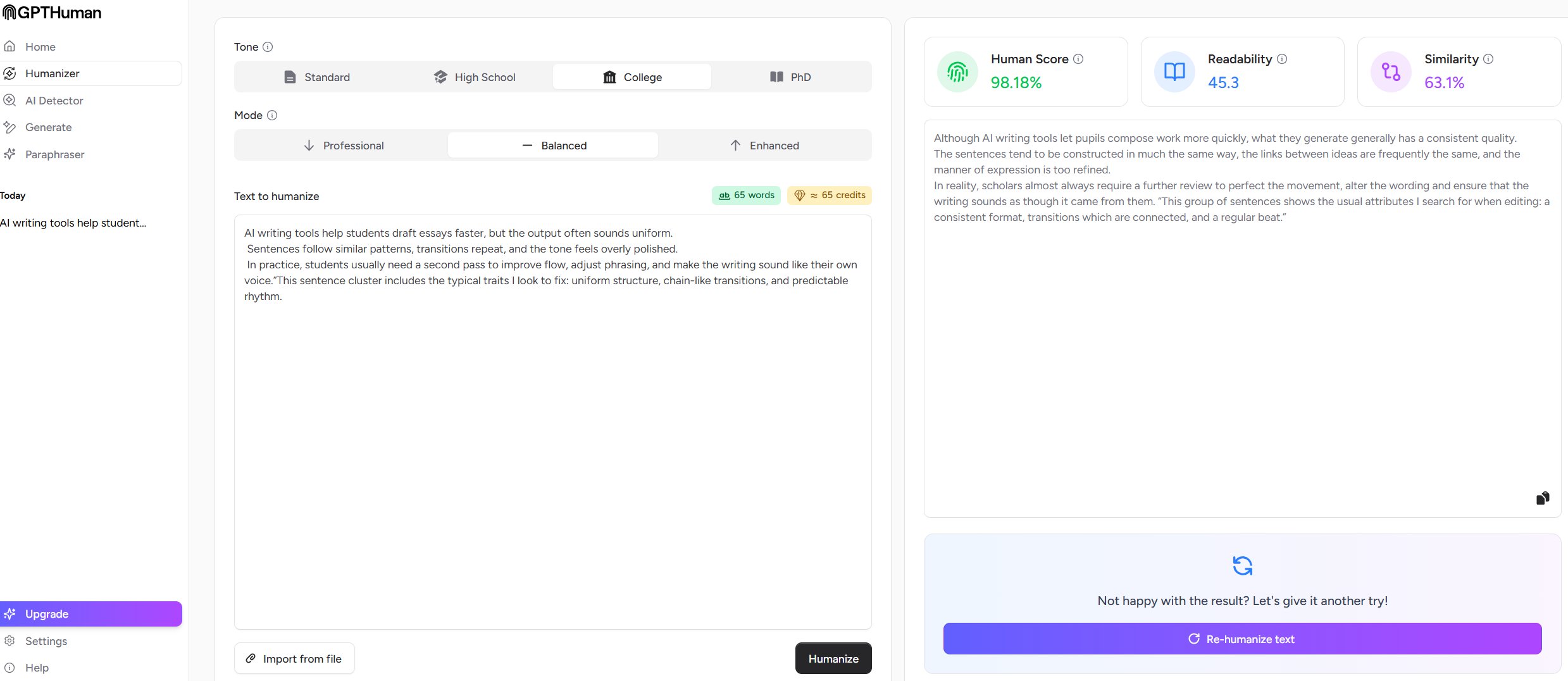
Although AI writing tools let pupils compose work more quickly, what they generate generally has a consistent quality. The sentences tend to be constructed in much the same way, the links between ideas are frequently the same, and the manner of expression is too refined. In reality, scholars almost always require a further review to perfect the movement, alter the wording and ensure that the writing sounds as though it came from them. “This group of sentences shows the usual attributes I search for when editing: a consistent format, transitions which are connected, and a regular beat.”
GPT human AI Output:
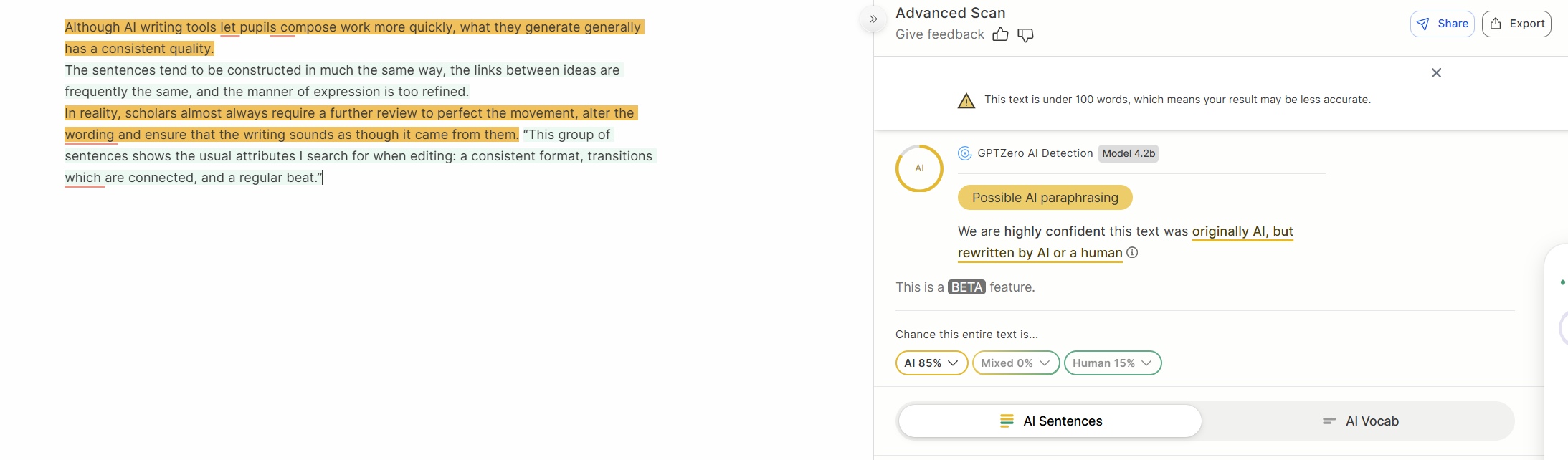
GPT Human AI output tested on GPTZero: Possible AI paraphrasing
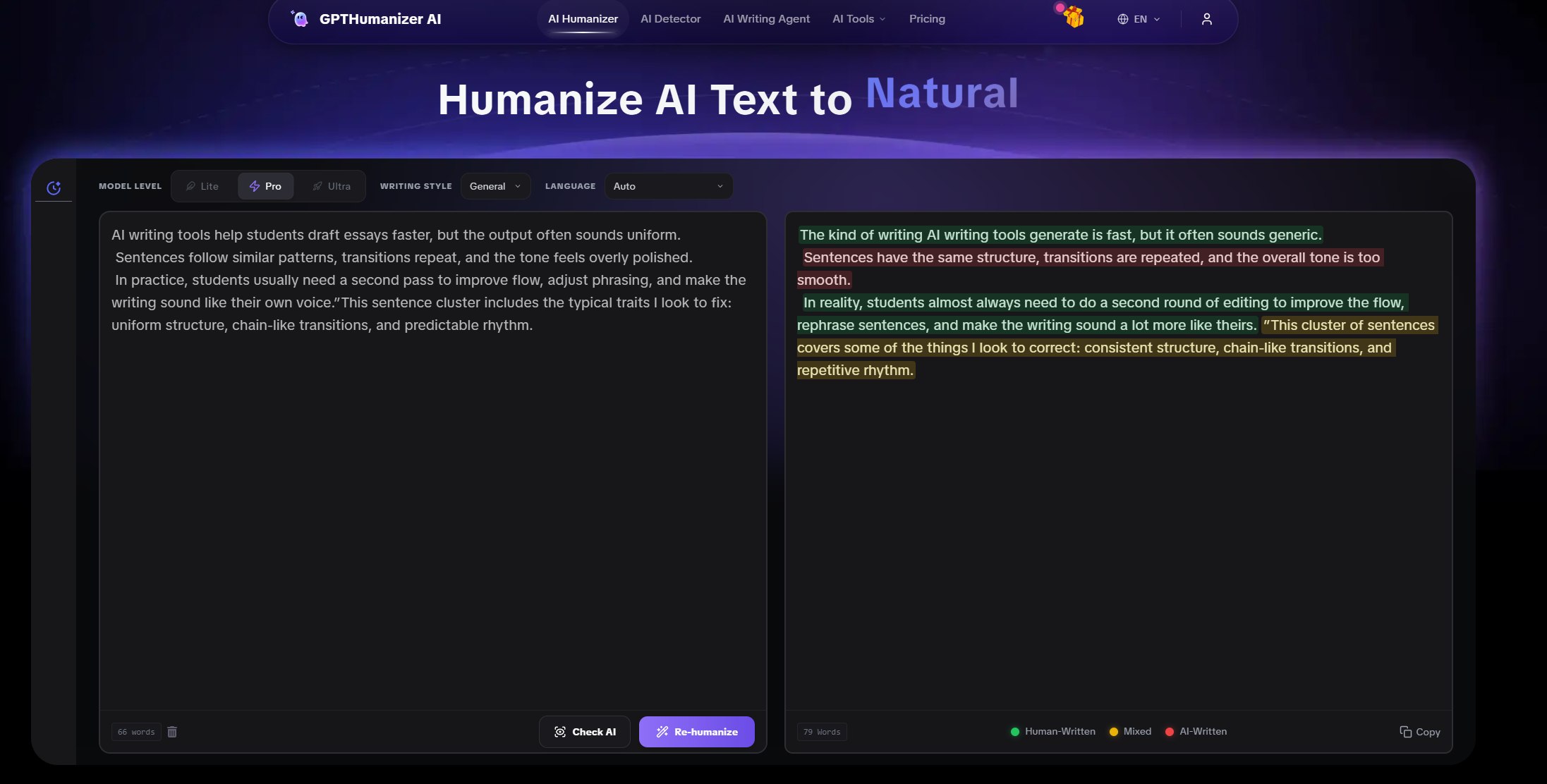
GPTHumanizer Lite (excerpt):
“AI tools speed up drafting, but first outputs often sound oddly uniform.
You’ll notice the same sentence shapes and repeated transitions.
A quick second pass—tightening flow and rephrasing key lines—usually makes the voice feel genuinely human.”
GPT humanizer AI Output:
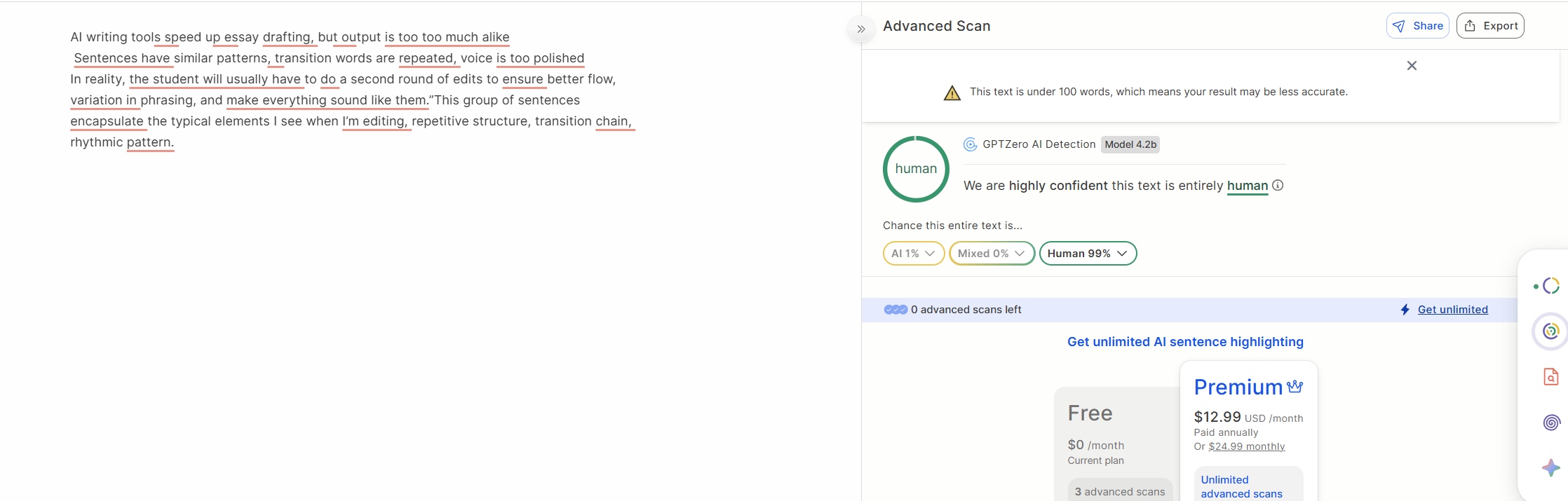
GPT Humanizer AI output tested on GPTZero: Entirely human
How I Scored These Rewrites (Rubric + Why It Matters)
I used both editor judgment and measurable proxies to make my comparisons clearer:
Scoring dimensions (explained)
1. Readability
● Does the text feel easy and natural to read, without awkward constructions or forced phrasing?
2. Human-likeness (rhythm/variation)
● Does the text avoid uniform patterns and predictable sentence shapes?
● This closely relates to readability and human feel.
3. Meaning preservation
● Does the meaning stay true to the original message?
4. Cleanup needed
● How much manual editing would I still do after the rewrite?
Scoring results (my hands-on editor ratings)
Dimension | GPTHuman AI | GPTHumanizer Lite | My takeaway |
Readability | 8.2/10 | 8.7/10 | Lite felt slightly tighter and cleaner |
Human-likeness | 7.6/10 | 8.6/10 | More natural rhythm and variation |
Meaning preservation | 8.8/10 | 8.5/10 | GPTHuman AI was very faithful on first pass |
Cleanup needed | 2–3 tweaks | 1–2 tweaks | Less manual smoothing needed with Lite |
Summary: both tools can produce usable rewrites, but GPTHumanizer’s passage felt more natural with fewer manual adjustments—especially useful when doing repeated passes as part of real editing.
Why GPT Humanizer’s Output Feels More Human
Human writing typically contains sentence-length variation and rising/falling rhythms that avoid monotonous structures. To illustrate this objectively, I counted the words in each sentence for each tool’s output.
Version | Sentence word counts | Average | Variation (std dev) | How it feels |
GPTHuman AI | 19 / 22 / 21 | 20.7 | 1.25 | Smooth but even |
GPTHumanizer Lite | 14 / 13 / 20 | 15.7 | 3.09 | Noticeable variation |
The use of shorter first sentences and slightly longer third sentences creates a rise-and-fall cadence where the sentences are more natural to read aloud. This is a typical feature of text produced by humans and not humans. I suspect human editors add this variation consciously, so it is an important difference in real-world use, not just in theory.
Where Each Tool Continues to Shine
This’s not a “better/worse” call.
● GPTHuman AI has cool things that help steer your edits, with things like built-in AI detection and lists of available rewrite modes (i.e. casual, formal, creative).
● GPTHumanizer AI (Lite)’s strength lies in the core “edit loop”: you can keep editing in small chunks without a quota, which is a better fit for my own long-form edits.
If your goal is a single guided rewrite with a few style presets to choose from, GPTHuman AI pays off. If your goal is repeated iteration and edits without friction and limits, then the free GPTHumanizer Lite workflow I recommend is more realistic.
Final Verdict: What I Recommend in 2026
For free, repeated real editing with no limits on how often you use it:
👉 GPTHumanizer AI (Unlimited Free Lite) is the most practical choice.
For a guided rewrite and integrated detector with rich features:
👉 GPTHuman AI remains a strong tool—but its per-output caps make it feel like a demo first, daily editor second unless you opt for a higher plan.
Play to each tool’s strengths depending on your workflow. If you want to go deeper, I can help you plan a series of cluster posts that drill into workflow comparisons, pricing strategies, long-form editing guides, and SEO use cases around the “gpt human ai” keyword.
Frequently Asked Questions (English FAQ) About GPTHuman AI
Q1: Does GPTHuman AI actually bypass all premium AI detectors?
Some marketing claims state GPTHuman AI can bypass all major AI detectors, but real user tests have shown mixed results. In tests where outputs from GPTHuman AI were run through external detectors like GPTZero and ZeroGPT, many outputs were still flagged as AI-generated—even when the internal “human score” suggested otherwise.
Q2: Why do some users think GPTHuman AI’s internal “human score” is misleading?
GPTHuman AI shows a built-in “human score” on its interface after rewriting text, but users have reported that the internal score often doesn’t match what external detectors output. Several reviewers noted that relying only on that internal metric gives a false sense of safety.
Q3: What happens when you run GPTHuman AI output through third-party detectors?
In forum tests, when humanized text was tested on detectors like GPTZero and ZeroGPT, the outputs were sometimes flagged as AI 100% by external detectors—even when the internal score was high.
Q4: Is GPTHuman AI’s free tier useful for serious editing?
Users online have pointed out that GPTHuman AI’s free tier is small—around 300 words—making it challenging to fully test or edit longer pieces without creating multiple accounts.
Q5: What do users struggle with when it comes to quality of rewritten text?
In discussion forums, some users reported issues like word swaps that don’t fit context, awkward phrasings, and sentences that feel stitched together or grammatically inconsistent—requiring manual correction afterward.
Q6: Can GPTHuman AI improve readability and tone even if detection isn’t perfect?
Many reviewers admit GPTHuman AI can enhance readability and natural tone on a surface level, making text sound more human, even if detection bypassing isn’t guaranteed.
Q7: What kinds of users talk about GPTHuman AI online?
People discussing the tool range from students and writers focused on making essays sound natural, to marketers trying to adjust content for SEO and readability. Experiences vary, with some praising flow improvements and others noting inconsistent detection outcomes.
Q8: Do GPTHuman AI’s detector results match external detectors?
Several users have pointed out that GPTHuman AI’s detector often shows high “human” scores internally, but external detectors like GPTZero flag the same outputs as AI content. This mismatch is a common theme in real-world tests.
Q9: Is GPTHuman AI reliable for professional or academic use?
Some reviewers highlighted that while basic readability improves, the tool may not fully align with strict academic or professional detection standards, making it better for casual or initial editing rather than final submission without further review.
Q10: Should you trust only the tool’s internal metrics?
Users consistently warn against trusting only internal metrics or labels from humanizer tools, suggesting cross-checking with external detectors and human judgment for confidence.

Related Articles

RLHF for AI Humanizers: Why Reinforcement Learning Doesn’t Make Text Human (2026)
A practical, editor-first view of how RLHF can improve AI humanizers: learn what feedback signals ma...
 Ethan Miller
Do I Still Need to Edit After Humanizing? A Complete Guide
Still need to edit after humanizing? Yes. GPTHumanizer AI helps tone, but you must review facts, mea...
Ethan Miller
How to Use GPT Humanizer AI to Humanize AI Text: Settings, Modes, and Workflow
A step-by-step guide on how to use GPTHumanizer AI to make your AI content sound more natural. Cover...
Ethan Miller
How to humanize ai for SEO (Without Losing Keywords): A Practical Workflow for SEO Freelancers (2026)
A keyword-safe workflow for rewriting AI drafts for SEO: preserve primary terms, strengthen topical ...
Ethan Miller